
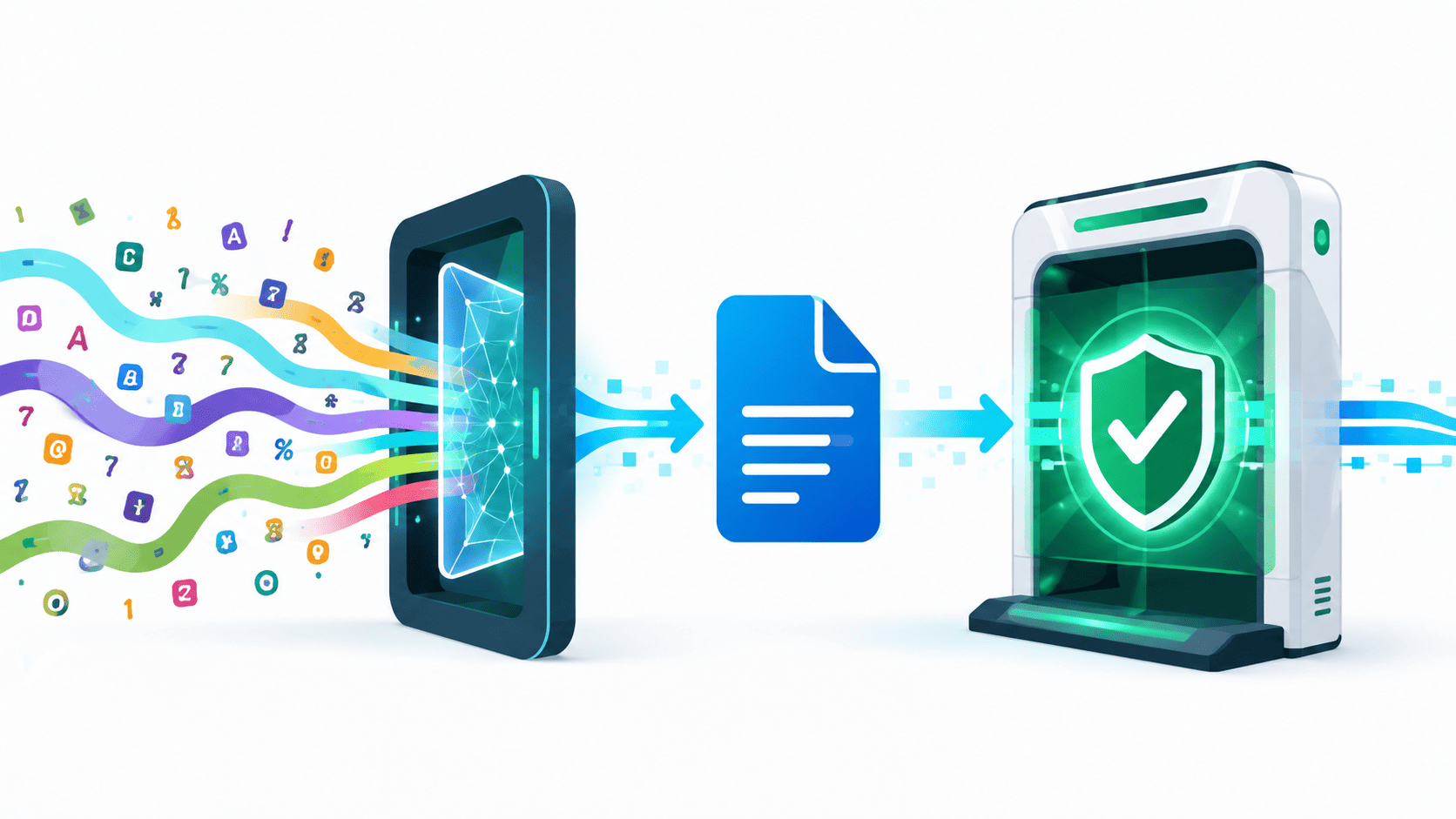

Validate input after canonicalization, not before. Security checks should inspect the same form of data the application will use. MITRE lists this ordering issue as CWE-180, which covers validation before canonicalization and can contribute to problems such as path traversal.
For developers, the process should be clear. Decode and normalize untrusted input under a defined policy. Then validate the canonical value. If access control applies, authorize that value before using it. This approach belongs in Secure Coding Practices as part of normal input handling, not as a filter added later.
Keep reading to see why validation order matters.
Canonicalization Checks That Keep Validation Secure
- Canonicalization should precede security validation when transformations can change the meaning of untrusted input.
- Validation must target the representation used by the security-sensitive sink, such as a filesystem, parser, database, or authorization layer.
- Canonicalization is not authorization. The canonical value still needs allowlist, type, range, boundary, and business-rule checks.
What Does Canonicalization Mean in Secure Input Handling?
Canonicalization is the process of taking every variation of a piece of data and reducing it to a single, standard representation, the “canonical” form, before the application evaluates or processes it. In secure input handling, its primary goal is to resolve ambiguous representations so the application evaluates the true, underlying meaning of an input rather than a hidden or misleading encoding. To dive deeper into the basics of this security concept, check out understanding input canonicalization.
As MITRE’s CWE guidance (specifically CWE-180: Incorrect Behavior Order: Validate Before Canonicalization) emphasizes, order is everything: decode and canonicalize input first, then validate it.
Understanding the Difference: Canonicalization vs. Sanitization
It is critical not to confuse canonicalization with sanitization:
- Canonicalization: Decodes, normalizes, and translates input into its true, singular form. It does not alter, restrict, or remove data based on safety rules; it simply reveals what the input actually is.
- Sanitization: Actively modifies or strips out potentially dangerous characters (e.g., removing <script> tags or escaping HTML entities) to make the data safe for a specific output context.
The Two-Step Security Sequence
To prevent encoding-based bypasses, input handling in secure development labs is broken down into two distinct phases:
- Normalization: Convert the raw, untrusted input into its absolute, final form by stripping away external encodings and resolving relative paths.
- Validation: Check that fully normalized final form against strict allowlists or restrictive security rules.
Common Transformations That Alter Input Meaning
Attackers exploit the gap between raw input and executed input using several common transformations:
- URL and Percent Decoding: Single decoding turns %2e%2e%2f into ../. Double decoding bypasses weak filters: %252e%252e%252f decodes once to %2e%2e%2f (which passes bad filters looking for ..), then decodes a second time in the application layer to ../.
- Path Resolution and Normalization: Input like /var/www/html/../../etc/passwd or mixed slashes (..\..\etc\passwd) can resolve to sensitive system directories if dot-segments and directory separators are not resolved prior to validation.
- Unicode Normalization: Characters with visual similarity or multiple representations (like full-width characters or accented letters) can bypass string filters and normalize into control characters or syntax later in execution.
- Case Normalization: Case-insensitive contexts (like file systems or SQL queries) can allow inputs like sELeCt or aDmiN to bypass strict case-sensitive checks if case handling isn’t standardized early.
- Parser-Level Changes: Variations in how XML, HTML entities, or JSON parsers handle whitespace, comments, and escaped sequences can lead to differences between what security middleware inspects and what the backend parser executes.
The Core Vulnerability: Validation Before Canonicalization
Checking raw text before it is fully decoded creates a dangerous gap between what got checked and what the application actually executes. If an input passes an early security filter because it looks safe, but is subsequently transformed or decoded into a malicious payload deeper in the execution path, the early check offers no real protection. Securing input requires eliminating this gap by ensuring validation always happens on the true, final representation of the data.
Why Does Checking Before Canonicalizing Cause Problems?
When you validate input before canonicalizing it, you might approve something that only turns dangerous after it gets decoded or resolved. CWE-180 gives a great example of this using file paths. A path can look totally safe at first. Then resolve somewhere else entirely once the system processes it.
In a recent analysis by USENIX
“To have any predictability in a distributed system, which is really just a fancy name for a system with more than one component, it is natural to implicitly assume that all of its parsers interpret messages passed between the components in the same way. Whenever this assumption, made explicitly or implicitly, is violated, vulnerability likely ensues.” – USENIX
Here’s a simple comparison we use in training:
| Step | Unsafe Approach | Safer Approach |
| 1 | Receive untrusted input | Receive untrusted input |
| 2 | Validate the raw representation | Decode according to a defined policy |
| 3 | Canonicalize after validation | Canonicalize or resolve the value |
| 4 | Use the transformed value | Validate the canonical representation |
| 5 | — | Authorize the validated value when required |
| 6 | Use the transformed value | Use the same validated representation |
Say an app only allows files inside /safe_dir/. Someone sends /safe_dir/../secret. A weak check just sees that it starts with /safe_dir/ and lets it through. Easy mistake. But once canonicalization runs, that path actually points to /secret. Somewhere it was never supposed to reach.
So the real problem was never that a check was missing. The problem is that the check looked at the wrong version of the input. That mismatch between the value that gets checked and the value the application eventually uses is where a canonicalization security risk can emerge.
We run into this pattern constantly during code reviews. A filename gets checked before Unicode normalization happens. An ID gets checked before parsing. A URL gets checked before the app follows its redirect. If something later changes what that value points to, the earlier check doesn’t count for much. That’s exactly why we make our students trace every single transformation, from the moment input comes in to the moment it’s finally used.
What Does CWE-180 Actually Say About Validation Order?
CWE-180 is all about the risk of validating data before canonicalizing it. It connects closely with CWE-20, improper input validation, and CWE-22, improper pathname restriction. We usually teach these three together since they build on each other.
The big lesson we want students to walk away with. The order you validate in is itself a security control. Get that order wrong, and it won’t matter how good your allowlists, range checks, extension checks, or permission rules are. They’ll end up checking the wrong thing entirely.
How Can Encoding Bypass an Input Validation Rule?
Here’s a trick that catches a lot of people off guard: you can hide dangerous text by encoding it, so a filter doesn’t catch it. Then later, when something decodes that text, the danger shows up again. MITRE’s CWE-20 guide says the fix is to decode and clean up input before you check it. If you check first and decode later, you might miss what you’re actually letting through.
| Representation | Potential interpretation |
| %2e%2e%2f | ../ |
| Encoded separators | Path separators |
| Alternate encodings | Equivalent dangerous syntax |
Say a filter blocks ../ but lets %2e%2e%2f slide right through. Looks safe, right? But if the server decodes that value later, it turns right back into ../, and now the file system sees the dangerous version.
It gets worse when more than one part of your system decodes things on its own. Maybe a proxy gets %252e%252e%252f. The app turns that into %2e%2e%2f. Then something further down the line reads that as ../. CWE-180 and CWE-174 both talk about this problem, decoding order and repeated decoding.
We tell our students to write one clear rule for this: decode once, agree on which encoding you’ll allow, pick which part of the system is in charge of reading it, and settle on one trusted format for everything. Consistent normalizing of user input also reduces the chance that different components will interpret equivalent values in different ways. Skip this, and your proxy, server, and app can all disagree about what the input actually means. We’ve seen students exploit exactly this gap in our own lab exercises.
Why can double decoding create another bypass?
Double decoding is risky for a simple reason: different parts of your system can transform the same value without talking to each other. The first decode might spit out something that looks harmless and passes your check. Then a second decode reveals what it really was.
The safer move is to decode once, then check it against one agreed format. If you really do need to transform it again later, check it again after that too. We teach it as one simple loop:
decode → validate → transform → validate again → execute
The fewer times you transform a value, the fewer places a bypass can hide. If you can stick to one trusted format the whole way through, do that.
Why Is Path Traversal a Classic Canonicalization Failure?
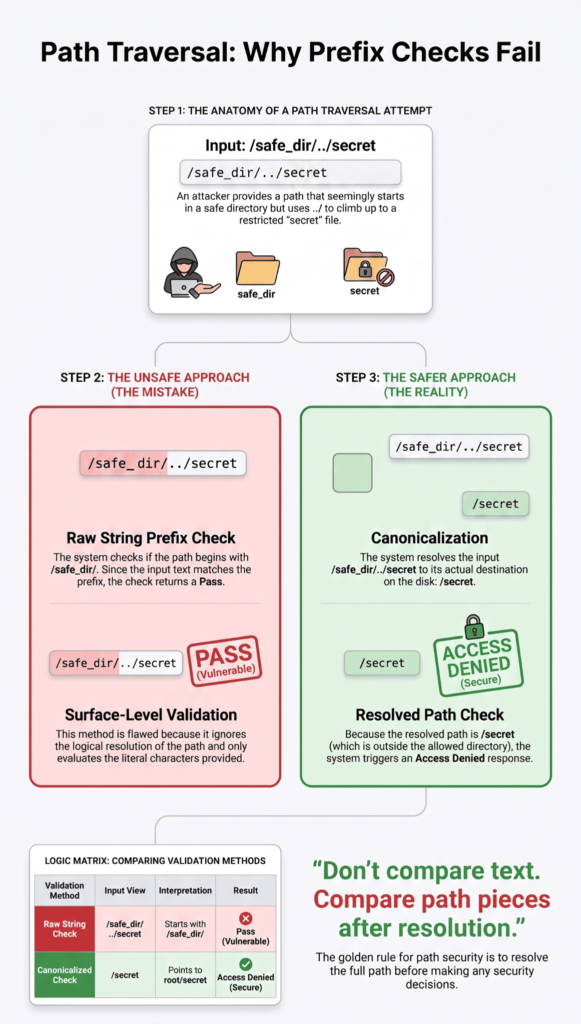
Path traversal is considered a classic canonicalization failure because systems routinely attempt to evaluate security policies on raw string representations rather than resolved filesystem locations. In filesystem operations, multiple distinct string representations (such as ./file.txt, uploads/../file.txt, or %2e%2e%2ffile.txt) can refer to the exact same physical resource on disk.
When an application performs security checks before normalizing the input, it validates an alias rather than the destination. The core underlying issue is canonicalization divergence, the security filter interprets the string one way, while the underlying OS filesystem parser resolves it another way.
Why Checking Only ../ Fails (Denylist Vulnerabilities)?
Relying solely on string matching to strip or reject ../ represents a classic denylist approach. It assumes you can anticipate every syntactic variation an attacker might use to represent a directory traversal.
Common Bypass Techniques
- Encoded Traversal Sequences: Bypassing simple string matches using URL encoding like %2e%2e%2f or %2e%2e/.
- Double Encoding: Hiding sequences behind nested encoding layers (e.g., %252e%252e%252f) that pass string filters but get decoded by downstream parsers or frameworks before hitting the filesystem.
- Absolute Paths: Passing full paths like /etc/passwd or C:\Windows\System32\cmd.exe directly, completely ignoring the intended base directory.
- Alternative Path Separators: Utilizing Windows-style backslashes (..\..\) on systems or runtime environments that accept both / and \ as directory separators.
- Nested Traversal Strings: Supplying inputs like ….// or ….\ which, when stripped once by a naive regex match for ../, collapse back into a valid ../ sequence.
- Symbolic Links and Junction Points: Referencing validly named files or shortcuts within the allowed directory that point to restricted areas elsewhere on the system.
The String Prefix Trap: Why Raw Text Comparisons Fail?
A common mistake when attempting to fix path traversal is checking if the user-supplied string begins with the base directory path (e.g., path.startsWith(“/var/www/uploads”)).
String Prefix Vulnerabilities
- Sibling Directory Overlap: An input like /var/www/uploads-evil/secret.txt starts with /var/www/uploads, satisfying a simple text prefix check while writing to an unintended directory.
- Lack of Boundary Anchoring: Failing to append a trailing slash (e.g., requiring /var/www/uploads/) allows adjacent paths with matching prefixes to bypass boundary restrictions.
- Logical Component Mismatches: Comparing character sequences instead of discrete path components confuses directory names containing overlapping prefixes.
The Secure Lifecycle: Canonicalization Before Validation
To properly remediate CWE-22, the application must reduce the path to its single, fully qualified, unique canonical form before performing any security checks.
[ Raw User Input ]
│
▼
[ Canonicalize Path ] ──► (Resolve absolute path, symlinks, relative segments)
│
▼
[ Canonicalized Path ]
│
▼
[ Security Checks ] ──► (Verify path rests strictly inside allowed base root)
│
▼
[ File Access ]
Steps for Safe Path Validation
- Resolve to Canonical Form: Pass the untrusted input to the system’s native path resolution utility (such as realpath() in C/PHP, Path.of().toRealPath() in Java, or os.path.realpath() in Python). This strips relative indicators, resolves symbolic links, standardizes separators, and expands absolute paths.
- Verify Base Boundary: Ensure the canonicalized destination path explicitly begins with the canonicalized base directory path, anchored with a proper path separator (e.g., /var/www/uploads/).
- Apply Enforcement Controls: Once the true destination is confirmed, apply your allowlist restrictions, file extension/type validations, and user authorization checks directly against that verified canonical path.
Can Canonicalization Alone Make a Path Safe?
Canonicalization clears up confusion about what a path actually points to. It doesn’t tell you whether that path is safe to open. CWE-22 treats canonicalization as one part of the fix, not the whole fix.
A path can be perfectly clean and still be somewhere your app should never go. /etc/passwd is a totally valid, canonical path, and your app still has no business opening it.
We break this into three separate steps, and we push our students hard to keep them separate:
- Canonicalize the trusted folder and the requested path.
- Validate the result against your rules.
- Authorize the resource before you actually use it.
This isn’t just about files, either. A cleaned-up URL can still point to a banned website. A cleaned-up username can still belong to someone else. A cleaned-up object ID can still point to something the caller isn’t allowed to see.
In our experience, the biggest mistake beginners make is assuming “cleaned up” means “safe to use.” It doesn’t. Cleaning a value just makes it consistent. Your rules still have to decide if it’s actually okay.
Why is a canonical path still potentially unauthorized?
Canonicalization only answers “what does this point to?” It doesn’t answer “who’s allowed to open it?”
Say a request resolves to /var/app/private/report.pdf. There’s no confusion about the path anymore. But the person asking for it might not be allowed to see that file. Your app still has to check permissions after it knows exactly what’s being requested.
Our rule of thumb: check the canonical form first, then check permissions any time user input controls access to protected data.
Why should you avoid raw string-prefix checks?
Comparing raw text can trick you into mixing up folders that just happen to look alike.
Take these two:
/var/www/uploads
and:
/var/www/uploads-archive
They start with the same letters, but they’re two completely different folders.
We always tell students to compare path pieces, not plain text, treat a path like a structure, not just a string of characters. It’s a small habit, but in our own labs, it’s caught real bypass attempts that a simple text check would’ve missed.
How Do Symlinks and Other Filesystem Features Affect Validation?
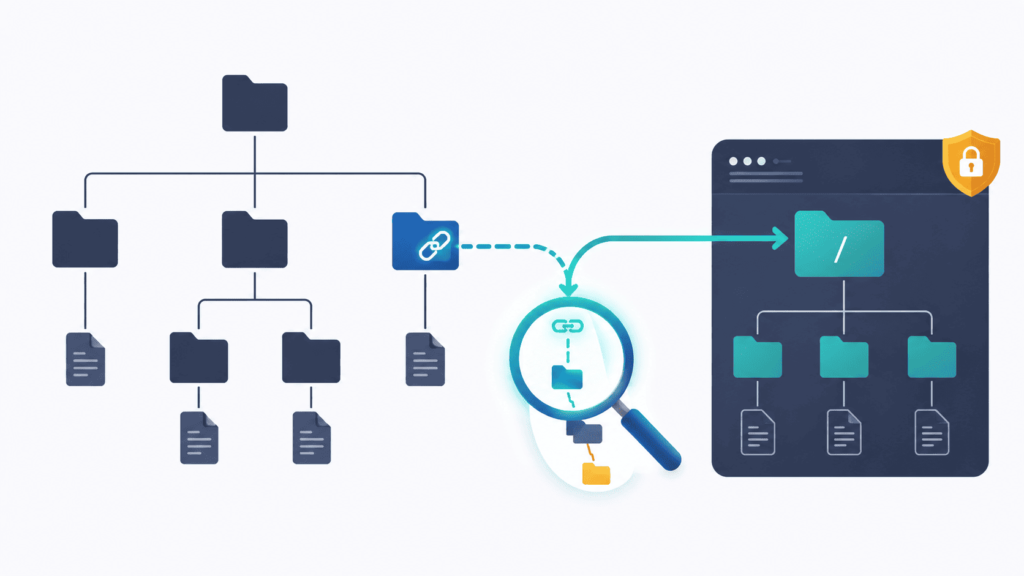
The difference between where a file path looks like it goes and where it actually goes is one of the most common traps in secure coding. Path validation fails when security controls operate on the string representation of a path rather than its actual filesystem reality.
Insights from SEI CERT Coding Standard indicate
“The process of canonicalizing file names makes it easier to validate a path name. More than one path name can refer to a single directory or file. Furthermore, the textual representation of a path name may yield little or no information regarding the directory or file to which it refers. Consequently, all path names must be fully resolved or canonicalized before validation.” – SEI CERT Coding Standard
Path Normalization vs. Path Canonicalization
Many developers assume cleaning up a string prevents directory traversal. However, lexical normalization and standard path resolution do fundamentally different things:
- Normalization (Lexical Cleanup): Simply strips out relative directory markers (. and ..) and resolves redundant slashes. It treats the path strictly as text. It cannot tell if /uploads/user1 is a real directory or a link pointing directly to /etc/passwd.
- Canonicalization (System Resolution): Interrogates the underlying OS filesystem to resolve all symbolic links, hard links, and junctions. It converts the path into its unique, absolute, physical target path before any security logic evaluates it.
Evaluating authorization policies against an uncanonicalized string creates a classic security gap: validating one representation while operating on another.
When Should Symbolic Links Be Rejected?
Accepting symlinks inside sensitive file workflows significantly expands your attack surface. You should evaluate whether to block or permit them based on these criteria:
- Strict Input Sandboxing: Reject symlinks outright when your application restricts user file access to a specific path (e.g., restricted upload folders or user isolated directories).
- Untrusted User Archives: Automatically disable or reject symlinks when extracting compressed archives (like .tar or .zip) uploaded by untrusted users to prevent arbitrary file writes or reads.
- Privileged Execution Contexts: Disallow symlink traversal when running processes with elevated privileges to prevent local privilege escalation.
- Controlled Administrative Links: Allow symlinks only when administrators explicitly use them for internal configuration management, provided validation checks the final target location rather than the source link name.
Where possible, avoid relying on string-based validation entirely. Using file descriptors, handle-based APIs, or directory-scoped restrictions (such as openat() in POSIX systems) drastically reduces filesystem-level validation hazards.
How Time-of-Check to Time-of-Use (TOCTOU) Complicates Canonicalization?
Even if you canonicalize and validate a path correctly, a race condition known as Time-of-Check to Time-of-Use (TOCTOU) can render that check useless. Because filesystem state is mutable and asynchronous, the target can be manipulated between validation and execution:
- Resolve & Validate: The application canonicalizes /tmp/user_file to /tmp/user_file and verifies it sits safely inside the allowed /tmp/ folder.
- Attacker Exploitation Window: In the microsecond window following validation, an attacker replaces /tmp/user_file with a symbolic link pointing to /etc/shadow.
- Execution/Open: The application opens /tmp/user_file, following the newly created symlink and accessing sensitive system data.
Mitigating TOCTOU Vulnerabilities
To prevent state modification during the access window, apply these system-level strategies:
- Use File Descriptors: Open the file first, retrieve its handle, and perform validation checks on that specific handle or file descriptor rather than re-resolving the file path string.
- Leverage POSIX openat() Family: Perform filesystem operations relative to a open directory file descriptor rather than global absolute paths.
- Enforce Restrictive Directory Permissions: Ensure parent directories carrying validated files cannot be modified or written to by untrusted local users, preventing path swapping.
- Apply Strict OS Link Protections: Utilize kernel-level protections (such as Linux protected_symlinks and protected_hardlinks sysctls) to block unprivileged symlink creation in sticky bit directories like /tmp.
How Should Authorization Use the Canonical Representation?
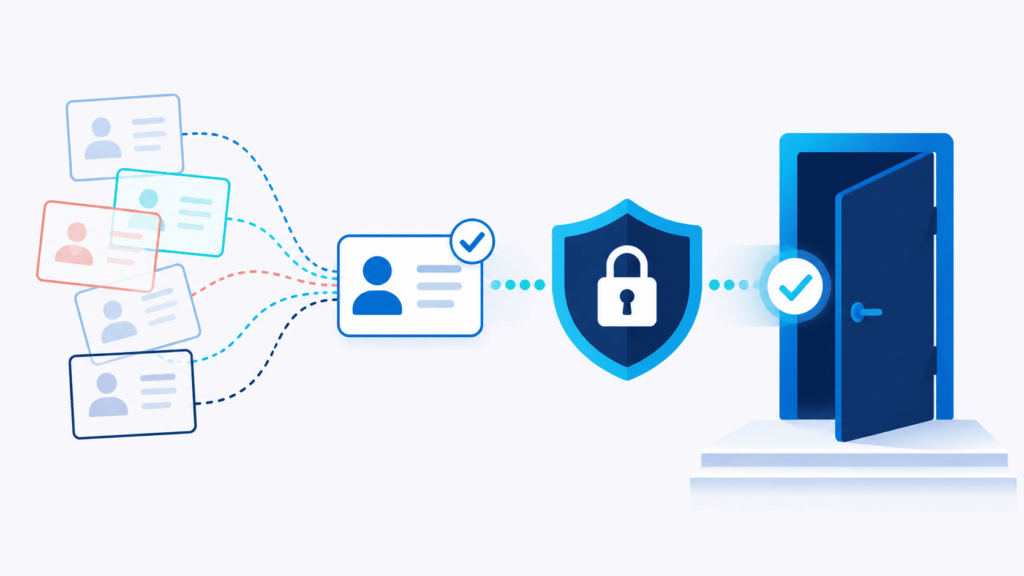
When your application makes access control decisions, authorization must always evaluate the canonicalized representation of the input, and that identical representation must be used for the final execution or file access.
Evaluating raw, uncanonicalized input, or canonicalizing input after authorization checks, creates a classic time-of-check to time-of-use (TOCTOU) vulnerability where the security decision applies to one resource, but the application operates on another.
The Canonicalization Pipeline
To prevent security bypasses, input processing should strictly follow a single, unidirectional pipeline:
[Untrusted Input]
↓
[Decode] (Resolve encodings like %20 or UTF-8)
↓
[Canonicalize] (Normalize paths, strip relative segments like ../)
↓
[Validate] (Check structure, allowlists, types)
↓
[Authorize] (Verify permissions against the canonical form)
↓
[Execute / Use] (Pass the EXACT authorized canonical object/string downstream)
By maintaining this explicit order, you eliminate the gap between what your security policies inspect and what your underlying system actually executes.
Risks of Authorization on Non-Canonical Data
When authorization logic receives raw or partially processed input, attackers can exploit differences in how the authorization engine and the target subsystem interpret the data:
- Path Traversal Bypasses: An access control rule might approve a request for /public/images/../../etc/passwd because it starts with /public/images/. If path normalization happens after approval, the file system opens sensitive system files instead.
- URL Routing Mismatches: Web frameworks often handle URL encoding differently across layers. An authorization filter might fail to match %2e%2e/admin against an access restriction, while the downstream router decodes the string and routes the request directly to the administrative panel.
- Identifier Aliasing: Databases, file systems, and APIs may treat equivalent identifiers differently depending on encoding, casing, or trailing characters (e.g., user@domain.com vs. user@domain.com ). Uncanonicalized checks can allow users to access resources owned by similar identifiers.
Core Implementation Principles
To keep your authorization checks reliable and predictable, follow these core practices:
- Canonicalize Early, Use Once: Transform input into its final, absolute form as close to the entry point as possible. Store or pass this single resolved instance throughout the entire request lifecycle.
- Enforce an Immutability Boundary: Once data is decoded, canonicalized, and validated, treat it as immutable. Never allow downstream components or utility functions to mutate, re-encode, or re-parse the authorization target.
- Fail Closed on Canonicalization Errors: If a path, URL, or identifier cannot be cleanly resolved into a deterministic canonical state (due to double-encoding, invalid null bytes, or circular references), drop the request immediately before reaching the authorization phase.
Which Implementation Patterns Reduce Canonicalization Bugs?
Canonicalization bugs occur when an application processes input in multiple forms, like encoded URLs, relative paths, or non-standard Unicode, leading to security vulnerabilities like path traversal (CWE-22). Based on the provided text, adopting built-in framework features and rigid input validation drastically lowers these risks.
| Prefer | Avoid |
| Path aware APIs | Manual string concatenation |
| Parsed identifiers | Arbitrary user supplied paths |
| Allowlist validation | Blacklist only filtering |
| One defined decoding policy | Uncontrolled repeated decoding |
When to Use Server-Side Resource IDs?
Applications should use server-side resource IDs whenever users do not strictly require direct access to raw file paths.
- Simplifies Authorization Logic: Changes the security check from verifying if an unpredictable path is safe to checking if a database record belongs to the user (does record 4821 belong to this user?).
- Reduces Attack Surface: Keeps the risky operation, resolving file paths on the file system, entirely hidden behind backend logic away from user influence.
- Improves Input Handling: Limits the necessary input checks to simple criteria like data type, length, existence, and authorization rules.
Why Should Applications Avoid Silent Sanitization?
Silently “cleaning up” or rewriting invalid input creates unexpected side effects that often introduce new security hazards.
- Accidental File Targeting: Stripping risky characters out of a path can rewrite the input into a valid-looking filename that points to an unintended or sensitive file.
- Masking Malicious Intent: Modifying bad input quietly allows malformed requests through as if nothing happened, making auditing and threat detection harder.
- Fail-Fast Security Principle: Security checks should be explicit. If input fails validation, the application should reject it loudly and immediately rather than attempting to fix it automatically.
How Should Developers Test Canonicalization and Validation Order?
We tell every student in our bootcamp the same thing. Test the raw input. Then test what it turns into after the app processes it. A bypass can hide anywhere in that chain, after decoding, after normalization, after the path gets resolved. MITRE CWE 22 says the same thing. Watch for weird encodings, odd separators, and traversal tricks.
We use a simple list with 5 test categories:
| Test Category | What to Test | Expected Security Control |
| Encoded Traversal | Decode values such as encoded path separators and traversal sequences | Validate the canonical value |
| Absolute Paths | Submit paths that ignore the intended directory | Enforce the trusted path boundary |
| Redundant Components | Test ., .., and repeated path components | Check the resolved location |
| Alternate Separators | Test platform-specific or mixed path separators | Apply the correct platform semantics |
| Unicode Variants | Test equivalent or unusual Unicode representations | Validate the normalized representation |
Don’t stop just because the raw input looks bad. That’s a common mistake we catch in reviews, over and over. You have to follow the input the whole way through.
Say you’re testing an encoded traversal attack. Check what the app first gets. Check what decoding does to it. Check what canonicalization does to it. Check what authorization actually looks at. And check what finally hits the filesystem. That’s a much better test than just checking if a regex blocks one string.
What should each test prove?
We ask students to prove five things with every test:
- The transformation works the same way every time.
- You know what the canonical form looks like.
- Validation happens after the transformation, not before.
- Authorization checks the same version validation checks.
- Only the validated value reaches the sink.
Bad input matters too. Broken UTF 8, confusing encodings, odd Unicode, parser errors, cut off data, all of it needs a clear failure path. It shouldn’t just fall through and get picked up by some other parser by accident. That kind of silent handoff is where things go wrong.
One question we ask a lot in code review. What value actually reaches the sensitive part of the code? Simple question. It usually uncovers hidden changes buried in middleware, frameworks, serializers, URL handlers, database drivers, or filesystem code.
What Are the Most Common Canonicalization Mistakes?
Credits: Moz
Most mistakes come from checking the wrong version of the input, transforming it more than once, or comparing plain strings when you need something more solid. MITRE CWE 20 calls this out directly. Decoding after validation. Or decoding twice by mistake.
Here are 7 mistakes we see over and over:
- Validating before decoding or normalizing.
- Decoding again somewhere further down the code.
- Only checking for obvious traversal patterns like “../”.
- Canonicalizing to validate, then using the original input anyway.
- Comparing strings with simple prefix checks.
- Letting different parts of the app read the same input differently.
- Treating sanitization like it’s authorization.
Number four causes the most trouble, honestly. The app does everything right. It canonicalizes, it validates. Then the code quietly uses the original raw input for the real operation. The check itself was fine. It just checked the wrong thing.
This is why we teach students to track their data, not just validate it. You need to know exactly which variable holds the trusted, canonical version. One slip back to the raw input, and the whole check was pointless. All that work, gone.
How can code reviews catch representation mismatches?
Start at the entry point. Follow the input all the way to where it gets used. Mark every step that can change what it means:
decode then parse then normalize then canonicalize then validate then authorize then process
Then check if anything transforms the input after a security decision was already made.
We also ask a simple question. Does the whole system use one decoding policy? If a proxy decodes the input once, and the app decodes it again, the app might end up validating something that nothing downstream will ever actually see.
A good code review doesn’t just look at the validation function by itself. It looks at the whole pipeline. Every step of it.
How Can Secure Coding Practices Build a Canonicalization First Workflow?
To build a Canonicalization-First Workflow, secure coding practices must treat input handling as a linear assembly line where every stage builds directly on the previous one. When security controls run out of order, attackers exploit the gap between what your validation engine sees and what your sink executes.
CWE-180 highlights this exact vulnerability pattern: validating raw or partially decoded inputs lets malicious payloads obscure themselves through double-encoding, relative path traversal, or alternate Unicode forms.
The 5-Stage Secure Pipeline
To prevent parser disagreement and context confusion, input must flow sequentially through these five distinct stages:
| Stage | Security objective |
| Decode | Establish a defined input representation |
| Canonicalize | Resolve equivalent forms |
| Validate | Enforce syntax and business rules |
| Authorize | Approve the intended resource |
| Use | Preserve the validated representation |
4 Core Rules Developers Must Remember
Keeping canonicalization, validation, and authorization distinct prevents subtle security bypasses:
- Validate the exact payload the sink executes: If your database or file system receives a normalized string, validate that normalized string. Checking an early representation leaves room for transformation attacks later in execution.
- Lock down data immutability post-validation: Prevent downstream code, secondary libraries, or background jobs from re-encoding, trimming, or modifying the validated payload before consumption.
- Rely on structured, battle-tested APIs: Avoid writing custom string-parsing logic, regular expressions, or path cleanup routines. Use native runtime tools like java.nio.file.Path.normalize() or URLDecoder correctly chained together.
- Prefer server-side identifiers over raw paths: Replace user-controlled file paths or raw resource routes with opaque server-side IDs (such as UUIDs) whenever possible to eliminate path traversal risk entirely.
Avoiding Parser Mismatches Across Your System
Inconsistency across an application stack invites critical vulnerability patterns:
Common Discrepancy Pitfalls
- Encoding Disagreements: A Web Application Firewall (WAF) checks incoming requests as plain UTF-8, while the backend database engine silently normalizes invalid UTF-8 sequences into valid SQL commands.
- Path Resolution Gaps: An authorization middleware check passes a relative string like /public/../admin/data, while the underlying file system resolves it directly to /admin/data.
- Multiple Normalization Steps: Component A trims whitespace, Component B strips trailing slashes, and Component C decodes percentage symbols, resulting in none of the modules agreeing on the final payload state.
Enforcing one clear, system-wide policy ensures all modules, parsers, and services interpret inputs identically. Keeping these three jobs strictly separated makes the application predictable, easier to audit, and far simpler to trust.
FAQ
Why should I validate input after canonicalization instead of checking the raw value?
Validating input after canonicalization helps security checks evaluate the same value that the application will process. A safer sequence is to decode, normalize, parse, and validate untrusted input before processing it. This approach supports canonical form validation, reduces parser discrepancies, and helps prevent validation bypass attacks caused by encoded, obfuscated, or ambiguous input that appears harmless before transformation.
What is the safest order for handling encoded or normalized user input?
A practical sequence is to decode the input, normalize it, parse it, and then validate the resulting value before processing it. This approach supports consistent input validation rules and produces a canonical input representation. For applications that handle Unicode or encoded data, UTF-8 decoding, character encoding checks, and Unicode normalization can reduce ambiguity before security validation checks are applied.
How does canonicalization help prevent validation bypass attacks?
Canonicalization helps prevent attackers from using different representations of the same value to bypass security controls. By creating a consistent canonical form, developers can apply allowlist validation, type validation, length validation, and range validation to the value that the application will actually process. This approach can reduce risks from encoded input attacks, multiple encoding attacks, and dangerous input patterns.
What should I check after normalizing user input?
After normalizing input, apply validation rules that match the expected data. Server-side input validation can include data type enforcement, length validation, range validation, regular expression validation, and security allowlists. Syntactic validation can confirm that the value follows the required format, while semantic validation can confirm that the value makes sense for the application’s intended use.
Does input sanitization replace validation after canonicalization?
No. Input sanitization and canonicalization serve different purposes. Canonicalization creates a consistent representation of the input, while validation determines whether that representation is acceptable. A secure validation sequence should normalize the input before sanitization when sanitization is required, followed by strict input validation. Relying only on sanitization can leave validation bypass opportunities, particularly when encoded or ambiguous input reaches later processing stages.
What Should Teams Remember About Validating Input After Canonicalization?
The key issue is simple: if the value reaching a security-sensitive operation isn’t the same representation that passed validation, your security boundary may not hold. Canonicalization helps put input into the form your application expects, but it doesn’t make that input safe. Validate after canonicalization, then authorize before use.
That approach gives teams a clearer way to handle encoded paths, URLs, Unicode, and parser differences without relying on assumptions about input. Secure Coding Practices can help make this process part of your secure development workflow, especially when building features that handle security-sensitive input.
References
- https://www.usenix.org/system/files/login/issues/login_winter20_issue.pdf#page=25#26#8
- https://cmu-sei.github.io/secure-coding-standards/sei-cert-perl-coding-standard/recommendations/input-validation-and-data-sanitization-ids/ids00-pl/