
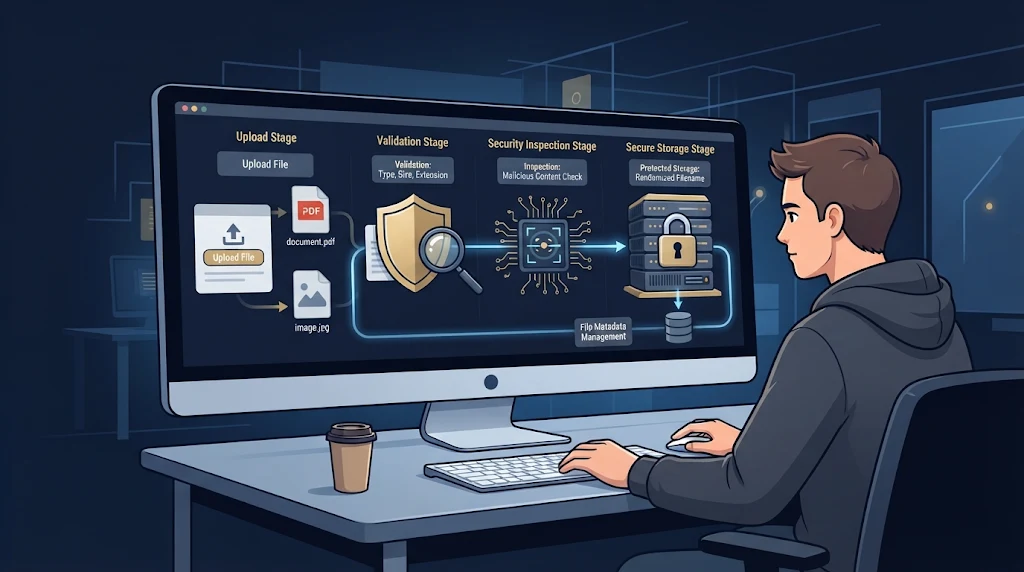

Secure file upload implementation in PHP and Java requires server-side validation, randomized filenames, private storage, and controlled downloads. Developers must inspect file content rather than trust browser-supplied filenames, extensions, or MIME types. OWASP recommends using multiple security controls to reduce the risk of malicious uploads.
At Secure Coding Practices, we focus on practical techniques that help developers protect uploaded files and prevent common security weaknesses. Whether you work with PHP or Java Spring Boot, understanding each stage of the upload process matters. Keep reading to explore secure implementation methods, code examples, and ways to protect application files.
Secure File Uploads: 3 Essential Security Checks
Secure file uploads depend on strong validation, safe storage, and controlled access. Keep these three priorities in mind when building PHP or Java upload features:
- Validate every file: Check extensions, MIME types, file signatures, and file size on the server.
- Protect uploaded content: Generate random filenames and store files outside executable directories.
- Control file access: Scan suspicious uploads, enforce authorization checks, and test upload and download endpoints regularly.
What Makes a File Upload Implementation Secure?
A secure file upload system treats every incoming file as untrusted. It doesn’t matter whether the file comes from a registered user or a business partner. Both can send harmful content, either by mistake or on purpose.
In our secure coding training, we teach developers to look beyond the upload form. A file may pass an extension check but still contain harmful content. Following a structured approach to validating and securing file uploads helps developers apply these checks throughout the upload process.
OWASP recommends combining several security controls. Each one addresses a different risk. Authentication checks who can upload, while content validation checks what they’re sending. Storage controls limit what happens after the upload.
The following table provides a useful reference during code reviews.
| Security control | Purpose | Example |
| Extension allowlist | Restricts formats | PDF, JPG |
| MIME inspection | Detects content type | finfo_file() |
| File signatures | Checks file structure | Magic bytes |
| Size limits | Controls resource use | 5 MB maximum |
| Random filenames | Avoids unsafe input | UUID |
| Private storage | Blocks direct execution | Outside web root |
| Access control | Protects private files | Authorization |
Browser-side checks can help users correct mistakes, but the server must make the final decision. Never accept a file because the browser says it’s valid.
Why Are MIME Type Checks Alone Not Enough?
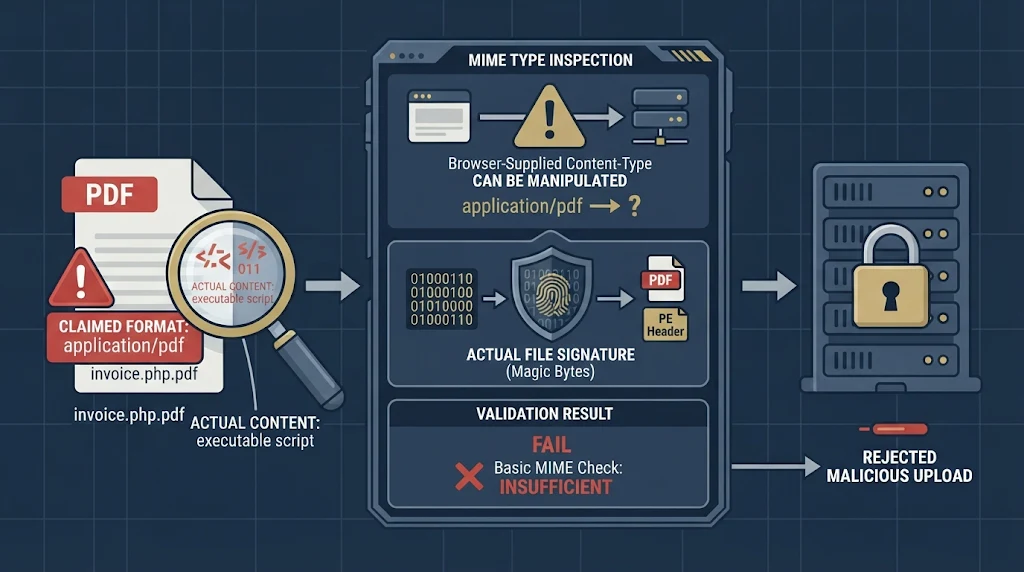
A MIME type tells an application what kind of content a file appears to contain. But it doesn’t prove that the file is safe.
This is a common mistake in file upload development. A developer checks the Content-Type request header and accepts the file if it says application/pdf. The problem? An attacker can change that header.
File extensions have the same weakness. Renaming malicious.php to document.pdf doesn’t change the content inside the file.
Server-side MIME detection is stronger than trusting a browser header, but it has limits too. It identifies content based on available file information. It cannot guarantee that a document contains no harmful code.
How can attackers bypass basic validation?
Several techniques can expose weaknesses in an upload endpoint:
- MIME spoofing: The attacker changes the supplied content type.
- Double extensions: A filename uses a pattern such as shell.php.jpg.
- Polyglot files: One file contains structures recognized as different formats.
- Path traversal: Directory references attempt to target other locations.
- Webshell uploads: A malicious script attempts to run on the server.
Consider an application that accepts images. It checks the file signature, then saves the upload in a directory where PHP execution is enabled. The file may still create a serious security risk.
What validation strategy works better?
We recommend checking the extension against an allowlist, detecting the MIME type on the server, and inspecting the file signature. For supported images, re-encoding can create a fresh output file instead of keeping the original upload.
Documents may need malware scanning or content sanitization. The right checks depend on the file types the application accepts.
No scanner catches every threat. So developers must also prevent uploaded content from executing. That way, a missed detection is less likely to become a server compromise.
How Should You Implement Secure File Uploads in PHP?
PHP provides built-in functions for handling uploaded files. But developers must use them carefully. A working upload form is not enough to protect an application.
Functions such as is_uploaded_file(), move_uploaded_file(), and finfo_file() support safer upload handling when used in the right order.
We teach developers to check the upload error first, verify the temporary file, inspect its content, and validate its extension. Only then should the application move it to permanent storage.
Which PHP functions should you use?
is_uploaded_file() checks whether a file came through a valid HTTP POST upload. The finfo_file() function detects its MIME type through server-side inspection. Developers can use random_bytes() to create a secure random filename.
The move_uploaded_file() function then moves the verified upload to its destination. It also checks that the source is a valid HTTP POST upload.
What does a safer PHP storage pattern look like?
The following example accepts PDF files up to 5 MB.
<?php
$tmp = $_FILES[‘file’][‘tmp_name’];
$originalName = $_FILES[‘file’][‘name’];
$size = $_FILES[‘file’][‘size’];
$maxSize = 5 * 1024 * 1024;
$allowedExtensions = [‘pdf’];
if (
$_FILES[‘file’][‘error’] !== UPLOAD_ERR_OK ||
!is_uploaded_file($tmp)
) {
throw new RuntimeException(‘Invalid upload’);
}
if ($size > $maxSize) {
throw new RuntimeException(‘File too large’);
}
$extension = strtolower(
pathinfo($originalName, PATHINFO_EXTENSION)
);
if (!in_array($extension, $allowedExtensions, true)) {
throw new RuntimeException(‘Unsupported extension’);
}
$finfo = new finfo(FILEINFO_MIME_TYPE);
$mime = $finfo->file($tmp);
if ($mime !== ‘application/pdf’) {
throw new RuntimeException(‘Unsupported file’);
}
$name = bin2hex(random_bytes(16)) . ‘.pdf’;
$destination = ‘/var/uploads/’ . $name;
if (!move_uploaded_file($tmp, $destination)) {
throw new RuntimeException(‘Upload failed’);
}
The code uses the original filename only to inspect its extension. It creates a different filename for storage, which reduces the risk of filename manipulation.
However, MIME detection doesn’t prove that a PDF is harmless. Production systems should also consider document inspection, malware scanning, restrictive directory permissions, and proper access controls.
This example assumes authentication, authorization, CSRF protection, and request-size limits are handled elsewhere.
Which PHP configuration settings should developers review?
PHP settings help control upload size and filesystem access. Review upload_max_filesize for individual files, post_max_size for the complete request, and max_file_uploads for the number of files accepted in one request.
The POST limit should allow room for multipart data and other form fields. Also review open_basedir and decide whether session.upload_progress is needed.
We recommend applying compatible limits at the web-server level. Disable PHP execution in upload directories and use restrictive filesystem permissions.
Configuration hardening reduces exposure, but it doesn’t replace content validation or isolated storage. Keep PHP and its dependencies updated, and review official security advisories before deploying changes.
How Do You Implement Secure File Uploads in Java Spring Boot?
Credits: Security in mind
Spring Boot handles multipart requests through MultipartFile. But the framework doesn’t automatically check whether an uploaded file is safe.
We recommend separating file validation from storage. This makes the code easier to review and helps developers find missing security checks. Applying secure file upload best practices for web applications also helps maintain consistent validation, storage, and access controls across different upload endpoints.
Which Java components should you use?
MultipartFile handles incoming uploads. Apache Tika can help detect their content type, while Files.copy() supports file storage. Developers can use UUID.randomUUID() to generate storage filenames.
Spring Security can protect upload endpoints through authentication and authorization rules.
How should a Java upload endpoint work?
The following example accepts PDF files and assigns a random filename.
@PostMapping(“/upload”)
public ResponseEntity<String> upload(
@RequestParam(“file”) MultipartFile file)
throws IOException {
if (file.isEmpty()) {
return ResponseEntity.badRequest()
.body(“Invalid upload”);
}
if (file.getSize() > 5 * 1024 * 1024) {
return ResponseEntity.badRequest()
.body(“File too large”);
}
String detectedType;
try (InputStream input = file.getInputStream()) {
detectedType = tika.detect(input);
}
if (!”application/pdf”.equals(detectedType)) {
return ResponseEntity.badRequest()
.body(“Unsupported file”);
}
String filename = UUID.randomUUID() + “.pdf”;
Path directory = Paths.get(“/var/uploads”)
.toAbsolutePath()
.normalize();
Path destination = directory
.resolve(filename)
.normalize();
if (!destination.startsWith(directory)) {
return ResponseEntity.badRequest()
.body(“Invalid destination”);
}
try (InputStream input = file.getInputStream()) {
Files.copy(input, destination);
}
return ResponseEntity.ok(“Upload successful”);
}
This example covers basic validation and storage. A production service should also check the extension, enforce user permissions, inspect document content, and handle storage errors.
We encourage developers to treat this code as a starting point, not a complete security solution. The upload directory must already exist and have suitable permissions. The application should also prevent overwriting existing files and handle duplicate storage identifiers safely.
Which Spring Boot settings should developers configure?
Spring Boot provides multipart settings for file size and total request size.
spring.servlet.multipart.max-file-size=5MB
spring.servlet.multipart.max-request-size=6MB
The first setting limits each file. The second limits the complete multipart request.
Use compatible limits at the reverse proxy and web-server levels. Also plan for upload timeouts, temporary storage cleanup, and consistent exception handling.
How Can You Prevent Filename and Path Traversal Attacks?
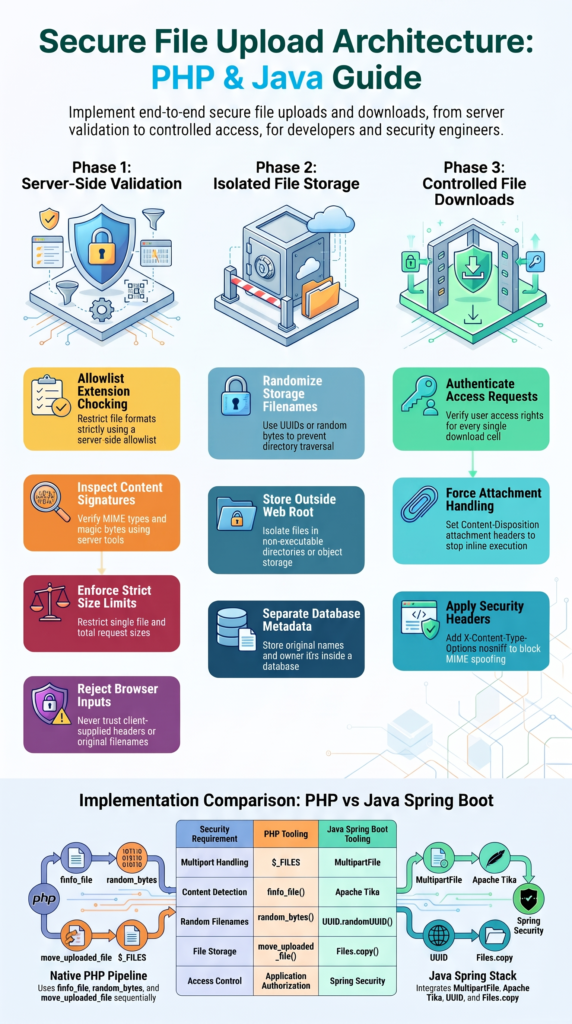
Never use a filename supplied by a user to build a storage path. An attacker may submit directory references or unusual characters to influence where the application saves a file.
Filename sanitization can reduce input-related risks, but generating a new filename is a safer approach. We recommend using random identifiers for physical storage and keeping the original filename as database metadata when the application needs it.
As highlighted by CISA
“Consider generating a random identifier for each file and storing associated metadata separately (e.g., in a database) rather than using user input when naming files.” – CISA
Which filename attacks should developers understand?
Several common attacks deserve attention during code reviews:
- Path traversal: Inputs such as ../ attempt to access other directories.
- Double extensions: Names such as shell.php.jpg exploit weak extension checks.
- Null-byte manipulation: Unexpected filename processing can cause validation problems in vulnerable systems.
- Absolute path injection: User input attempts to supply a complete filesystem path.
- Special characters: Unusual characters may affect file handling or application logic.
PHP developers can use random_bytes() to generate secure random values. Java developers can use UUID.randomUUID().
We also recommend resolving storage paths against a fixed directory and checking the normalized result. Never accept a complete storage path from a request.
For example, a document system can display contract.pdf to users while storing the physical file under a random identifier. This keeps user-facing information separate from filesystem operations.
Where Should Applications Store Uploaded Files?
Storage location matters because an uploaded file can become dangerous if the server executes it.
We recommend keeping uploaded files outside the web root. This reduces direct access through public URLs and lowers the risk of uploaded scripts running on the server. Restricting executable file uploads coding further reduces the chance that attackers can use uploaded scripts to execute unauthorized code on the application server.
OWASP also recommends using a separate storage server when practical. The right choice depends on application size, access requirements, and infrastructure.
Which storage option should you choose?
| Storage option | Main benefit | Main concern |
| Private local directory | Easy to set up | Permission management |
| Separate storage server | Better isolation | Extra infrastructure |
| Object storage | Scalable storage | Access policy setup |
| Pre-signed uploads | Less server processing | Strict URL controls |
For smaller applications, a private local directory may be enough. Larger systems may benefit from object storage with restricted access policies.
But cloud storage isn’t automatically secure. Developers must configure bucket permissions, object access, and upload restrictions.
In our secure coding training, we also teach developers to separate file metadata from physical storage paths. A database can store the original filename, owner, file ID, and storage reference without exposing the server location.
Pre-signed URLs can let users upload files directly to storage. Set short expiration periods and restrict the permitted operations. Never place untrusted uploads in a directory where server-side scripts can execute.
How Should You Secure File Downloads?
File security doesn’t end after an upload succeeds. The download process needs its own checks.
Imagine a document management system that stores private contracts. If the application uses public file URLs, anyone who obtains a link may access a document. That’s a problem, even if the original upload process was secure.
Which download controls matter most?
Every download endpoint should verify the user’s permissions before returning a file. We recommend using internal file IDs instead of accepting physical paths from request parameters.
The application should also set the correct Content-Type and use Content-Disposition: attachment for untrusted documents. This tells the browser to download the file rather than display it inline.
Add the X-Content-Type-Options: nosniff header to reduce the risk of browsers interpreting content as a different file type.
A Java download controller can look up a file through its database ID, check the user’s access rights, and return it with suitable response headers.
PHP applications should follow the same approach. Check permissions before reading the stored file.
For Nginx deployments, X-Accel-Redirect can help serve authorized files without exposing the storage directory.
We teach developers to treat every download request as a new access decision. Uploading one file doesn’t give a user permission to access every other file in the system.
How Can You Test a Secure File Upload Implementation?
A successful upload test doesn’t prove that an endpoint is secure. Developers must also test how the application handles invalid files and hostile requests.
Security testing also helps teams identify weaknesses before attackers exploit them. Working with PrimeSec can support a stronger approach to application security and vulnerability prevention.
We recommend including security tests throughout development rather than waiting until deployment. This gives the team more time to find and fix weaknesses.
Which test cases should developers include?
Use these cases during security testing:
- Valid files with approved extensions.
- Files with spoofed MIME headers.
- Double-extension filenames.
- Oversized uploads.
- Empty or corrupted files.
- Path traversal attempts.
- Malicious image samples.
- Unauthorized upload requests.
- Unauthorized download requests.
- CSRF attempts.
As noted by OWASP
“Try to upload the malicious files to the application and determine whether it is accepted and processed.” – OWASP
What should successful testing demonstrate?
The application should reject invalid files before permanent storage. Uploaded content must not execute, and users must not access documents without permission.
We also recommend checking that error messages don’t reveal internal paths or server configuration. Logs should record useful details without exposing sensitive information.
In our training exercises, we ask developers to test both expected and unexpected behavior. A PDF that uploads successfully is only one test case. What happens when someone changes its extension? What happens when another user tries to download it?
Those questions can reveal weaknesses that ordinary functional testing misses.
Repeat these tests after major changes to frameworks, upload libraries, or server configuration. Keep the results so the team can review its progress.
PHP vs. Java: Which Secure Upload Implementation Should You Choose?
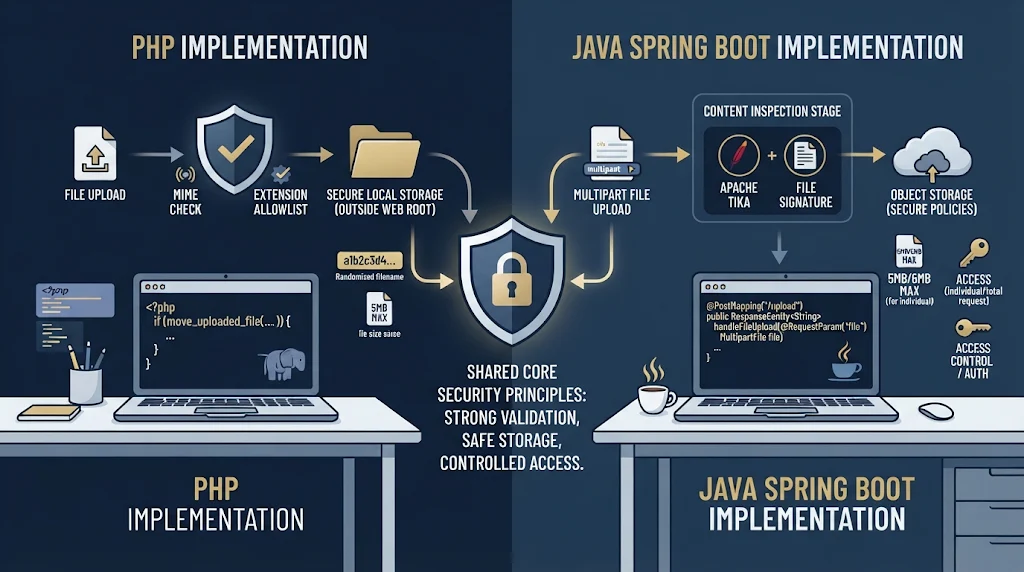
Both PHP and Java can support secure file uploads. The difference is mainly in how each language handles multipart requests, content inspection, and file storage.
The following comparison shows the main tools developers can use.
| Security requirement | PHP | Java Spring Boot |
| Multipart handling | $_FILES | MultipartFile |
| Content detection | finfo_file() | Apache Tika |
| Random filenames | random_bytes() | UUID.randomUUID() |
| File storage | move_uploaded_file() | Files.copy() |
| Size restrictions | PHP configuration | Spring configuration |
| Access control | Application authorization | Spring Security |
| Download handling | PHP download endpoint | Download controller |
When should you choose each approach?
PHP is a practical choice for teams maintaining existing PHP applications or building lightweight upload features. Java Spring Boot may suit applications that already use its security and request-handling features.
Object storage is worth considering when an application needs more storage capacity or better separation between file processing and persistence.
We don’t recommend choosing a language based on file upload security alone. Both can handle the same core protections when developers configure them correctly.
A poorly secured Java endpoint can be just as vulnerable as an insecure PHP endpoint. The important part is how the application validates incoming files, protects storage, and controls access.
For our secure coding students, comparing both implementations is also a useful way to understand that security principles apply across different programming languages.
FAQ
How can developers test file upload security beyond basic validation?
Developers should test more than valid files and rejected extensions. They should also upload oversized files, spoof MIME types, use double extensions, attempt path traversal, and submit corrupted documents. Teams should check whether unauthorized users can upload or download files. These tests help identify file upload vulnerabilities that ordinary functional testing may miss before deployment.
Should applications scan uploaded files before or after storage?
Applications should scan uploaded files before making them available to users or other parts of the system. A secure upload process can place incoming files in temporary storage, scan them for malware, and move them to permanent storage only after they pass the required checks. This approach reduces the risk of exposing users and systems to malicious files.
How should applications handle files that fail validation?
Applications should reject files that fail server-side validation and prevent them from reaching permanent storage. They should return clear error messages without revealing internal file paths or server details. Developers should also record relevant upload errors in audit logs and remove temporary files when processing fails. Rejected files must never remain in publicly accessible directories.
Can secure file uploads support large documents?
Yes. Applications can support large documents by setting suitable file size limits, request limits, and upload timeouts. PHP developers should configure upload_max_filesize and post_max_size, while Spring Boot developers should set max-file-size and max-request-size. For applications that handle many large files, private object storage can reduce the load on application servers.
What should developers consider when designing a secure file download process?
A secure download endpoint should verify the user’s identity and access permissions before returning a file. Developers should use internal file IDs instead of accepting filesystem paths from requests. They should also set Content-Disposition: attachment and X-Content-Type-Options: nosniff when appropriate. Keeping file metadata separate from storage paths helps prevent unauthorized access and path manipulation.
Build Safer File Upload Systems Before Deployment
A working upload endpoint doesn’t guarantee security. Developers must protect applications from malicious files and unauthorized access. Validate incoming files, generate random filenames, isolate uploaded content, and verify every download request. These checks matter whether you maintain a PHP application or build a Java Spring Boot service.
Help your team apply these practices through hands-on training with the Secure Coding Practices Bootcamp. Build practical security skills and learn to identify common vulnerabilities before they become real problems.
References
- “Secure by Design Alert: Eliminating Directory Traversal Vulnerabilities in Software.” CISA, May 2, 2024. Accessed November 7, 2026.
- “Test Upload of Malicious Files.” OWASP Web Security Testing Guide. Accessed November 7, 2026.