


Secure programming training teaches developers how to spot security risks, write safer code, and prevent vulnerabilities before software reaches production. It helps teams build security into everyday development instead of waiting until testing reveals a problem.
The OWASP Top 10 offers a guide to common application risks, such as injection attacks and broken access control. Developers can use these lessons to make better coding decisions, protect user data, and reduce avoidable flaws.
Strong security takes more than one final check. It starts with the choices made throughout development. Keep reading to explore the key principles and practices behind safer software.
Secure Programming Quick Wins
Secure programming training helps developers prevent common vulnerabilities, improve coding decisions, and build safer applications through practical skills and continuous learning.
- Recognize security risks: Developers learn to identify vulnerable code and apply defensive techniques during implementation.
- Practice with real scenarios: Hands-on exercises, role-based instruction, and automated testing help teams address security weaknesses earlier.
- Improve security over time: Continuous learning and measurable results support safer software throughout the development lifecycle.
Why Is Secure Programming Training Important for Developers?
Writing code that works is one part of a developer’s job. Making sure it does not expose user information or give the wrong people access is another.
Take a simple login feature. A user enters a password, the application checks it, and the user gets in. But the work does not end there. The application must also decide which pages, records, and actions that user can access. If those checks are missing, someone might see information that was never meant for them.
Secure programming training helps developers think about these situations before they become real problems.
“We find that while some developers experience excellent secure-coding training, others receive inadequate training, and the majority receive none.” – IEEE/ACM
The OWASP Top 10 is a useful resource for learning about common web application risks. It covers issues such as injection, security misconfiguration, cryptographic failures, and broken access control. Developers do not need to memorize every detail at once. They should understand what each weakness means and how it can affect an application.
Finding a security issue after release can be stressful. The team may need to stop other work, prepare a fix, test it, and check for possible damage. Sometimes the change is small. Sometimes it affects several parts of the application.
At Secure Coding Practices, we focus on helping developers build safer habits while they work. That includes looking at how code handles information, checking who can access certain features, and knowing when a security control is needed. These checks should fit into normal development work.
There are three basic security goals behind these practices:
- Confidentiality: Private information stays private. Only approved users can access it.
- Integrity: Application data cannot be changed without permission.
- Availability: Authorized users can reach the application when they need it.
A weakness in one area can affect the others. For example, an attacker who gains access to an account might not only view private records. They may also change or delete them.
What Security Risks Can Insecure Programming Create?
Security problems do not always come from complex attacks. Sometimes, the issue is a line of code that handles information in the wrong way.
Here are some examples developers should know:
- SQL injection: An attacker uses harmful input to interfere with a database query.
- Command injection: Input from outside the application affects commands run by the operating system.
- Cross site scripting (XSS): A website displays untrusted content in a way that allows unwanted scripts to run in another user’s browser.
- Broken access control: A user can reach a page, feature, or record without the required permission.
- Exposed credentials: Passwords or API keys left in source code may give someone access to protected resources.
- Vulnerable dependencies: Software packages with known security flaws can put an application at risk.
Consider a website where customers can check their orders. Each order has its own ID. A customer signs in and opens an order page. If they change the order ID in the request, could they see another person’s purchase?
They might, if the application only checks that the customer is logged in.
This is an example of Broken Object Level Authorization (BOLA). The application must check whether the signed in user can access that particular order. It is not enough to check their identity once at login.
How Does Secure Programming Reduce Software Vulnerabilities?
Developers cannot prevent every possible attack. But they can avoid many common mistakes by learning how to handle code and data safely.
The NIST Secure Software Development Framework (SSDF) recommends including security practices throughout software development. It also highlights the need to train staff based on their roles.
“Following these practices should help software producers reduce the number of vulnerabilities in released software.” – NIST
In everyday work, developers can:
- Think about possible security risks before building a new feature.
- Follow coding guidelines when writing and updating code.
- Check whether user input and access permissions are handled properly.
- Run security tests to look for weaknesses.
- Test their fixes instead of assuming the problem is gone.
Security tools can make these checks easier. They are not a replacement for understanding the code, though.
For example, a scanner may flag a database query. That warning gives the developer a place to start. They still need to inspect the query, see how it uses outside input, and decide how to correct it.
That is where training helps. Developers learn to understand the warning instead of simply trying to make it disappear.
What Are the Core Principles of Secure Programming?
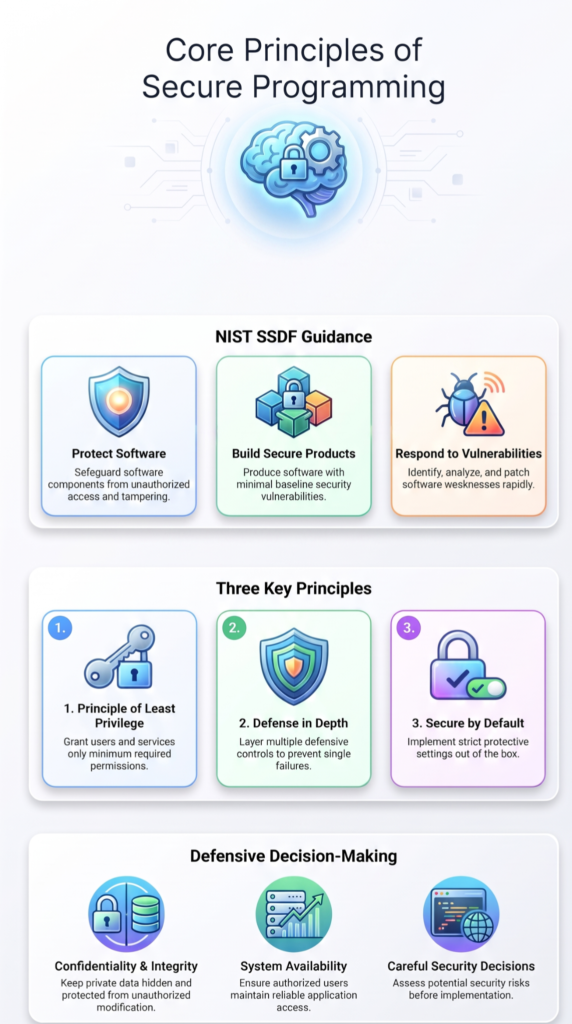
There is no single trick that makes software secure. Developers need to make a series of careful decisions, from setting permissions to handling information that comes from users.
The NIST SSDF provides guidance on making security part of software development. It covers how teams protect software, build secure products, and respond to vulnerabilities.
Some of these ideas apply to almost any application. Three are worth looking at more closely.
How Does the Principle of Least Privilege Protect Applications?

An application does not need to give every user full access. In fact, doing so can create unnecessary risk.
The principle of least privilege means giving each user, service, or process only the permissions needed for its work. A system that reads customer records, for example, should not automatically have permission to delete them.
Why does this matter? If an account is taken over, limited permissions can stop an attacker from reaching parts of the system that the account does not need.
Developers can put this principle into practice through:
- Role Based Access Control (RBAC): Users receive permissions based on their roles.
- Service permissions: Background processes can only use the resources they need.
- Database permissions: Database accounts have limited read, write, or administrative access.
- Authorization checks: The application checks a user’s permission before allowing an action.
There is one common mistake worth avoiding. Removing a button from a page does not prevent someone from using the feature. A person may still send a request directly to the server. Permission checks must happen on the server, not just in the interface.
Why Should Developers Use Defense in Depth?

Relying on one security measure is risky. What happens if it fails?
Defense in depth answers that question by using several layers of protection. Each layer has a different job. Together, they make it harder for one mistake to expose the whole application.
For example, a website collects customer details and stores them in a database. It checks submitted information before processing it. It also uses parameterized queries so user input cannot change SQL commands. The database account has limited permissions, too.
If one check misses something, another may still help.
Some common measures include:
- Checking user input before processing it.
- Using parameterized queries for database operations.
- Applying login and access controls.
- Encrypting sensitive information.
- Keeping network and application settings secure.
- Monitoring activity and protecting audit logs.
These measures are not interchangeable. Input validation helps reject unexpected information, but it does not replace parameterized queries. Developers need to understand what each control can and cannot do.
We include these differences in Secure Coding Practices training because choosing the right control matters. Adding a security measure without understanding its purpose may leave the original problem untouched.
What Does Secure by Default Mean in Software Development?
Source: Computerphile
Users should not have to search through settings to turn on basic security features. Secure by default means an application starts with protective settings already in place.
It also means the application should take the safer action when something goes wrong. If it cannot confirm that a user has permission, it should deny access.
Developers can follow this approach by:
- Blocking access when permission checks fail.
- Turning off features and endpoints that are not needed.
- Limiting the permissions given to administrator accounts.
- Using secure connections for sensitive information.
- Avoiding default passwords and exposed settings.
Unused features can create problems, too. Every extra service or API endpoint gives an application another possible entry point. Removing what is not needed can reduce that exposure.
Imagine an administration page meant only for internal staff. A missed deployment setting should not make that page available to the public. The application still needs to check permissions before showing protected content.
The basic idea is simple. Security should already be there when the application starts running, not depend on someone remembering to add it later.
FAQs
How Can I Tell If a Secure Programming Course Fits My Needs?
Before enrolling, check whether the secure programming course covers the programming languages, frameworks, and tasks you use at work. Look for practical exercises based on real coding problems, clear instructor feedback, and current security threats. A good course should also show you how to apply secure coding standards during development rather than focus only on security terms and theory.
What Should Teams Do When They Cannot Replace Legacy Code?
Teams should review legacy code, identify vulnerable components, and prioritize fixes based on their potential impact. Application security training can help developers assess risks, update unsafe functions, and test changes without disrupting existing features. Teams should also document unresolved vulnerabilities, assign responsibility for each issue, and schedule regular reviews until they can address the remaining risks.
How Should Developers Assess Security Risks in Third-Party Packages?
Developers should check who maintains each package, how often it receives updates, and whether it has known vulnerabilities. Developer security training should also cover dependency scanning, software composition analysis, and safe package management. Teams should remove unused dependencies, update vulnerable versions, and review package permissions. They should also establish an approval process before adding new third-party components.
When Should a Vulnerability Block a Software Release?
Teams should block a release when unresolved vulnerabilities create serious risks to application data, user accounts, or system access. Secure software development training can help developers assess vulnerability severity and apply consistent release criteria. Teams should document accepted risks, assign remediation deadlines, and require further testing before deployment when a security issue could expose sensitive information or disrupt essential services.
Does a Secure Programming Certification Prove Practical Ability?
A secure programming certification shows that someone has completed a course or passed an assessment, but it does not automatically prove practical ability. Developers should look for programs that include coding exercises, vulnerability identification, and remediation tasks. A useful secure coding assessment should require learners to explain security weaknesses, correct vulnerable code, and demonstrate how their changes prevent similar issues.
Make Secure Programming Part of Everyday Development
Writing code that works isn’t enough if it leaves an application open to security risks. Developers need to understand how small coding mistakes can expose sensitive data or create weaknesses attackers can exploit. Security matters from the start.
The Secure Coding Practices Bootcamp helps developers put safer coding habits into practice through hands-on training. The two-day program covers the OWASP Top 10 and includes practical labs, session replays, cheatsheets, and a completion certificate.
Online and in-person sessions are available, along with custom corporate training and volume discounts. If you’re ready to strengthen your development skills, join the Secure Coding Practices Bootcamp and bring better security practices into your everyday work.
References
- https://ieeexplore.ieee.org/document/10649741
- https://csrc.nist.gov/pubs/sp/800/218/final