
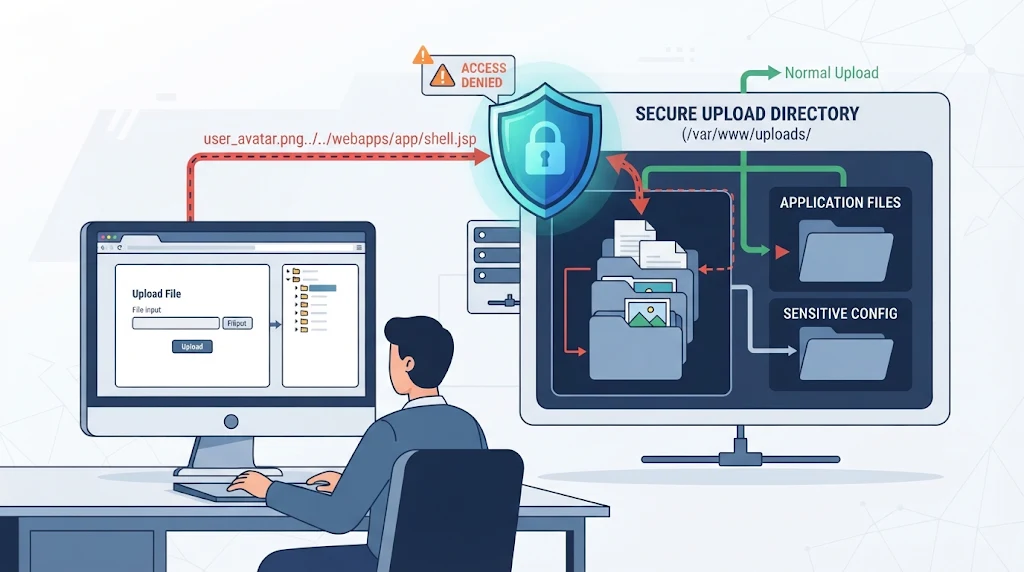

Directory traversal file upload risk occurs when attackers manipulate filenames or file paths to write files outside an application’s approved storage directory. This can expose sensitive data, overwrite application files, or create opportunities for remote code execution. CISA has documented the ongoing threat through vulnerabilities listed in its Known Exploited Vulnerabilities catalog.
At Secure Coding Practices, we focus on how developers can prevent these flaws through proper filename handling, server-side validation, and restricted file permissions. Blocking ../ alone is not enough. Keep reading to examine real vulnerabilities, common coding mistakes, and practical ways to secure file uploads.
File Upload Security: 3 Critical Lessons to Prevent Directory Traversal
Directory traversal prevention depends on controlling file paths, restricting storage access, and testing upload handling before deployment.
- Control uploaded filenames: Generate random filenames on the server instead of trusting client-controlled filenames.
- Restrict file storage: Validate canonical paths, use limited filesystem permissions, and store uploads outside the web root.
- Test upload security: Check encoded paths, archive extraction, file overwrites, and unauthorized access to identify weaknesses before deployment.
What Is Directory Traversal in a File Upload Feature?
Directory traversal happens when an attacker manipulates a file path to reach a location outside the directory an application allows. In file uploads, this often happens because the application trusts a filename supplied by the user.
Consider a normal upload destination:
/uploads/document.pdf
Now imagine someone submits this filename instead:
../../webapps/app/shell.jsp
The ../ characters tell the system to move up one directory. If the application uses this filename without proper checks, the uploaded file may end up somewhere it shouldn’t.
That’s the problem.
CISA and the FBI describe this weakness under CWE-22, which covers improper limitation of a pathname to a restricted directory. Depending on the system’s permissions, an attacker may read, change, or create files outside the intended location.
We teach developers to look beyond the upload form. The real weakness often sits in the server-side code that decides where a file goes.
A normal upload stays inside its approved folder. A manipulated upload attempts to escape it. That’s why directory traversal prevention is a filesystem security requirement, not only a filename-filtering task.
Why Is Your Upload Filename an Attack Surface?
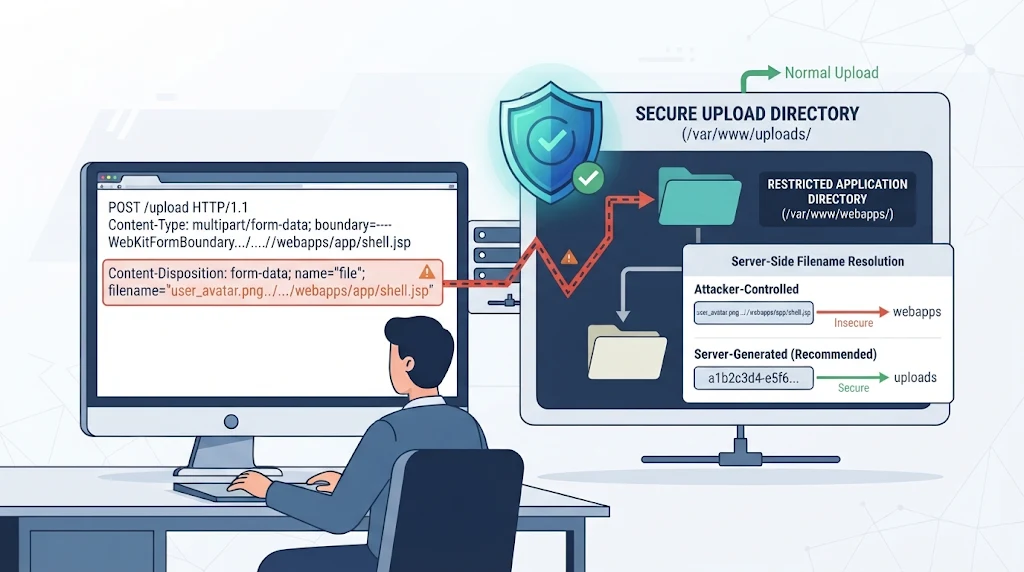
An uploaded filename is an untrusted input. It should never decide where the server stores files.
A browser displays a filename, so a developer may assume it’s harmless information. But the browser doesn’t control the entire upload process.
An attacker can create an HTTP request without using the normal upload form. They can change the filename value inside the multipart Content-Disposition header before sending it.
Consider this PHP example:
$path = “/uploads/” . $_FILES[“file”][“name”];
move_uploaded_file(
$_FILES[“file”][“tmp_name”],
$path
);
The code adds the submitted filename to the upload directory. It doesn’t check whether the final destination stays inside the approved folder.
Removing ../ alone won’t fix this. Attackers may also try Windows-style separators such as ..\, encoded paths, double encoding, or absolute paths. Different systems may process these values differently.
We recommend generating filenames on the server and keeping the original name as database metadata. If a path must be processed, resolve it to its canonical form and confirm that it remains inside the trusted directory.
OWASP also recommends using random filenames instead of trusting names supplied by users. These measures form part of validating and securing file uploads, where filename handling and server-side path restrictions work together to protect application storage.
How Can Directory Traversal Lead to Arbitrary File Writes and RCE?
Directory traversal can become an arbitrary file-write vulnerability when an application allows an attacker to save files outside the intended upload directory.
The damage depends on the server’s permissions. An upload process with access to application files creates more risk than one restricted to a private storage folder. Following secure file storage practices for uploaded files helps limit this exposure by separating uploaded content from application code and other sensitive resources.
An attacker who escapes the upload directory might try to overwrite application configuration, source code, server settings, or executable scripts.
Remote code execution (RCE) is possible when the uploaded content reaches a location where the server runs. For example, an unsafe PHP upload feature might allow a malicious script to reach a directory configured to execute PHP files.
| Security weakness | Possible consequence |
| Unrestricted uploads | Dangerous files accepted |
| Filename traversal | Files written outside storage |
| Arbitrary file write | Unintended files modified |
| Executable upload location | Possible code execution |
| Weak access controls | Greater system exposure |
We teach students to distinguish between arbitrary file writes and confirmed RCE. They are different findings. The final impact depends on filesystem permissions, server configuration, and other security controls.
How Does Zip Slip Create File Upload Security Risks?
Credits: Full IT Operations Courses
Zip Slip is another form of directory traversal. It occurs when an application extracts an archive without checking where each file will be written.
A ZIP archive can contain entries with their own file paths. An attacker may create an archive with a filename that attempts to escape the extraction directory.
For example, an application might extract files into:
/var/private/extracted/
But an archive entry could contain a path that points outside this folder. If the extraction process trusts that path, it may write files somewhere the application never intended.
The problem isn’t limited to ZIP files. Other archive formats and extraction tools also need proper path checks.
We include archive extraction in our secure coding exercises because developers sometimes forget that files inside an archive are also untrusted input.
OWASP’s Web Security Testing Guide identifies archive directory traversal as a file-upload testing concern.
Every archive entry needs its own destination check. The application should resolve the path and confirm that it remains inside the approved extraction directory before writing anything.
File count and decompressed size also matter. A malicious archive could contain thousands of files or expand into a much larger size than expected.
What Do Real CVEs Reveal About File Upload Traversal?
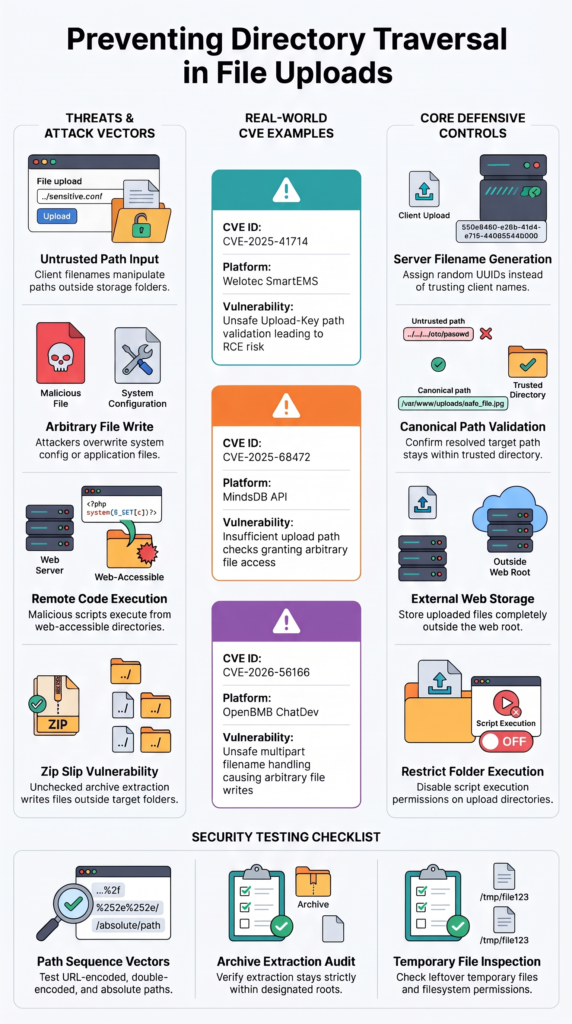
Published CVEs show that unsafe upload-path handling remains a real security problem. Several reported vulnerabilities from 2025 and 2026 provide useful examples for developers.
| Vulnerability | Reported security issue |
| CVE-2025-41714 | Unsafe upload-path handling in Welotec SmartEMS |
| CVE-2025-68472 | Path traversal in the MindsDB file-upload API |
| CVE-2026-58166 | Unsafe multipart filename handling in OpenBMB ChatDev |
CVE-2025-41714 affected Welotec SmartEMS Web Application versions before 3.3.6. Insufficient validation of the Upload-Key header could allow an authenticated attacker to create upload-related files outside the intended storage location. Certain configurations could also permit RCE.
CVE-2025-68472 affected MindsDB versions before 25.11.1. Its file-upload API had insufficient path validation, potentially allowing unauthenticated attackers to access arbitrary files.
CVE-2026-58166 affected OpenBMB ChatDev through version 2.2.0. Its upload endpoint did not safely handle attacker-controlled multipart filenames, potentially allowing arbitrary file writes or deletion.
These examples show why every filesystem operation needs proper validation. Developers must also check temporary-file creation and cleanup, not only the main upload process.
For our bootcamp exercises, real CVEs help connect insecure coding patterns with problems found in deployed applications.
How Can Developers Prevent Directory Traversal in File Uploads?
The strongest defense is to let the server control where uploaded files go. Developers should never allow an untrusted filename to determine the final storage path.
We recommend using server-generated filenames, such as UUIDs or cryptographically secure random identifiers. The original filename can remain in a database for display purposes, but it shouldn’t control the physical storage location.
Path validation matters too. The application must resolve the destination and confirm that it remains inside a fixed storage directory before writing the file. These controls are central to secure file upload best practices for web applications, particularly when applications handle untrusted filenames and different file formats.
As highlighted by OWASP ASVS
“Verify that untrusted file data submitted to the application is not used directly with file I/O commands, particularly to protect against path traversal, local file include, file mime type, reflective file download, and OS command injection vulnerabilities.” – OWASP ASVS
Here are the controls we recommend:
- Generate filenames on the server.
- Keep original names as metadata.
- Use a fixed storage directory.
- Validate canonical destination paths.
- Check file signatures and MIME types.
- Apply extension allowlists.
- Restrict filesystem permissions.
- Disable script execution.
- Require authorization for private downloads.
We also recommend storing uploads outside the web root. This reduces direct access and lowers the risk of uploaded scripts being executed through normal website routes.
For PHP applications, realpath() can help resolve existing paths. However, a new destination file may not exist yet, so developers must validate its trusted parent directory and final destination carefully.
Cloud storage needs similar attention. Keep buckets private, restrict object permissions, and use short-lived presigned URLs when temporary access is needed. Security teams can also work with PrimeSec to assess application security risks and strengthen protection against file upload attacks.
CISA’s Secure by Design guidance also recommends random file identifiers and separate metadata storage.
No single check protects the entire upload process. Combine these controls and review them during development, not only after a security problem appears.
How Should Developers Test File Upload Traversal Vulnerabilities?
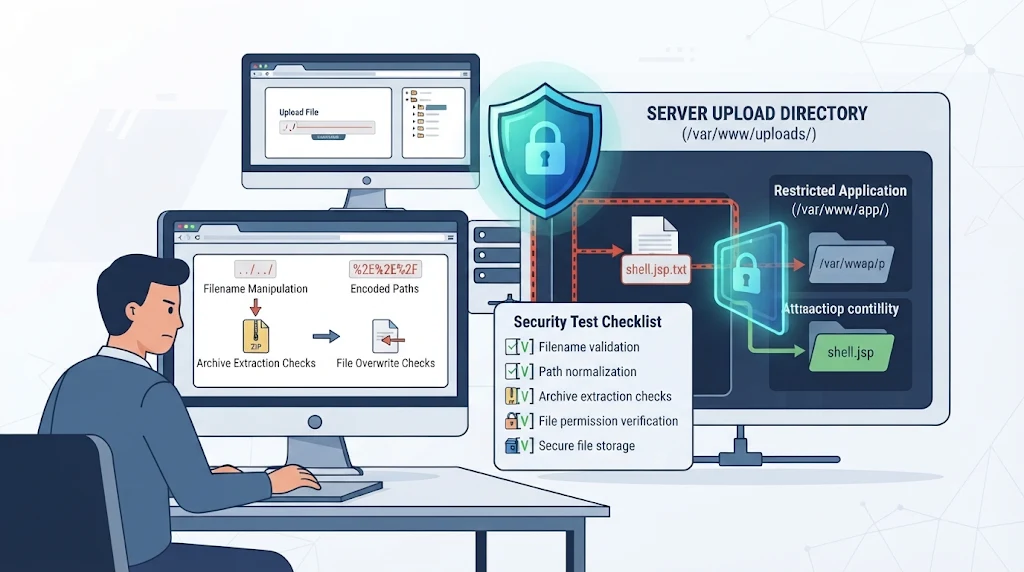
Developers should test whether manipulated filenames and archive entries can escape the approved storage directory.
We recommend performing these checks in an authorized development or staging environment. Testing against production systems without permission can cause data loss or service disruption.
During our secure coding exercises, we encourage students to inspect the actual filesystem result rather than rely only on the application’s response message.
For example, an upload might return an error while still leaving a temporary file behind. That’s worth investigating.
As noted by NHIMG
“Security teams should treat file upload and download features as high risk and test them with context driven techniques, not just a single payload. Good coverage includes path traversal sequences, alternate schemes such as file access, extension tampering, null byte attempts, and JavaScript review to uncover hidden endpoints.” – NHIMG
A practical security review should cover:
- Client-controlled filenames.
- Unix and Windows path separators.
- URL-encoded and double-encoded paths.
- Absolute path attempts.
- Archive extraction destinations.
- Existing file overwrite attempts.
- Temporary-file permissions.
- Unauthorized file downloads.
- Executable file handling.
| Test area | Expected secure behavior |
| Client filename | Server generates a new name |
| Encoded paths | Cannot bypass validation |
| Archive extraction | Entries stay inside the extraction root |
| File overwrite | Existing application files remain protected |
| Temporary files | Stored in restricted locations |
| Download endpoint | Private files require authorization |
OWASP’s Web Security Testing Guide provides further guidance on malicious uploads and archive traversal.
We also recommend checking file permissions after each test. A secure upload feature should not leave executable files or unexpected changes outside its approved storage directory.
After changing the upload code, repeat the same tests. A fix isn’t complete until the original attack attempts fail and the application leaves no unexpected files behind.
FAQ
How can developers identify directory traversal file upload risks before deployment?
Developers can identify directory traversal file upload risks by reviewing how applications process filenames and construct storage paths. Test upload requests with modified filenames, encoded traversal sequences, and absolute paths in a staging environment.
Then inspect the actual storage locations to confirm that uploaded files remain inside the approved directory. Do not rely only on HTTP response messages.
What is the difference between path traversal and arbitrary file upload?
Path traversal occurs when attackers manipulate file paths to access locations outside an application’s approved directory. Arbitrary file upload occurs when an application accepts files without proper restrictions. These are separate vulnerabilities, but attackers can combine them. For example, an attacker may exploit filename traversal to place an uploaded file in a sensitive server directory.
Can a malicious file upload bypass MIME type and extension checks?
Yes. Attackers can change file extensions or modify multipart form data to make malicious files appear legitimate. MIME type validation alone cannot confirm that a file is safe. Developers should combine extension allowlists, file signature checks, and content validation. They should also generate filenames on the server and prevent uploaded scripts from executing.
How does Zip Slip affect applications that accept archive uploads?
Zip Slip occurs when an application extracts archive entries without checking their destination paths. A malicious ZIP file may contain filenames with directory traversal sequences that write files outside the extraction folder. Developers should normalize each entry path and confirm that it stays inside the approved extraction directory. The application must reject unsafe paths before extracting any files.
What should a secure file upload checklist include?
A secure file upload checklist should cover filename generation, destination path validation, file type restrictions, storage permissions, and access controls. Store uploaded files outside the web root in a non-executable directory.
Set file size limits, scan files for malware, and protect private downloads with authorization checks. Regular security testing can help developers find weaknesses before attackers exploit them.
Prevent Directory Traversal in File Uploads
Directory traversal can expose sensitive files when untrusted filenames influence server-side filesystem operations. Blocking ../ alone won’t stop these attacks. Generate filenames on the server, validate canonical paths, restrict filesystem permissions, and keep uploaded files in private storage. Review these controls during development and security testing.
Strengthen your team’s file-handling skills through hands-on training with Secure Coding Practices. Learn to recognize unsafe filesystem operations and apply practical defenses before vulnerabilities reach production.
References
- “ASVS V16: Files and Resources.” OWASP. Accessed November 7, 2026.
- NHI Mgmt Group Editorial Team. “How should security teams test file upload and download paths for local file inclusion risk?” NHI Mgmt Group, September 10, 2026. Accessed November 7, 2026.