


Popular Java input validation frameworks help detect invalid formats, missing values, and incorrect data types, but they cannot catch every security risk. Attackers may exploit flaws in business logic or unsafe data handling even when input passes validation.
Secure Coding Practices address these gaps by adding safeguards that go beyond basic validation, helping developers reduce vulnerabilities and build more secure Java applications. Understanding where validation falls short is the first step toward better protection. Keep reading to learn more.
What Your Validation Framework Misses
Before looking at the details, here are three important points to remember:
- Context-aware validation stops attacks that format checks miss.
- Layered defense combines frameworks with secure coding practices.
- Regular rule updates are non-negotiable for security.
Why Do Popular Input Validation Frameworks Java Miss Some Security Threats?
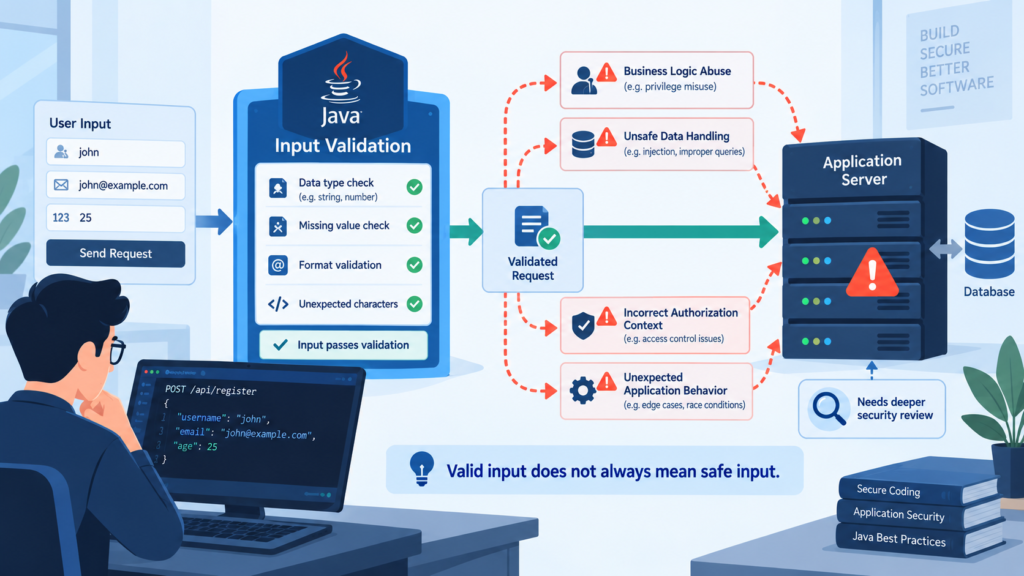
They’re built for syntax, not semantics. Input validation frameworks can perfectly validate an email address format, but they can’t tell if that email is a phishing attempt or belongs to a hijacked account. They see a string that looks right and let it through.
“Input validation does not always make data ‘safe’ since certain forms of complex input may be ‘valid’ but still dangerous. For example, a valid email address may contain a SQL injection attack or a valid URL may contain a Cross Site Scripting attack. Additional defenses besides input validation should always be applied to data such as query parametrization or escaping.” – Github
Think about a ZIP code field. Javax.validation or Hibernate Validator will happily accept “12345” as valid. It is valid, syntactically. But what if the user’s profile says they live in Canada? A Canadian postal code shouldn’t be five digits. The framework doesn’t know that, it just knows the input matches the pattern \d{5}. You need context the library can’t access.
We once built an API that used Bean Validation extensively. Every field was annotated. @NotNull, @Size, @Pattern. We felt secure. Then a tester found a business logic flaw. You could update another user’s profile by changing the user ID in the JSON payload.
The validation passed because the data types were correct. The framework did its job, but the application’s intent was violated. That’s the gap.
What’s the difference between validation and sanitization?
Validation says, “Is this input allowed?” Sanitization says, “Make this input safe.” They’re related but distinct steps in handling user data. A lot of developers, I’ve noticed, conflate them. They think validating a string is safe for a database query. It’s not.
- Validation is a check. It’s a boolean. True or false. This input meets the criteria, or it doesn’t.
- Sanitization is a transformation. It modifies the data to neutralize potential threats.
Take an HTML comment field. You might validate it to ensure it’s under 1000 characters. But if you just take that text and output it directly to a webpage, you’re open to Cross-Site Scripting (XSS). The validation passed, the attack works.
Sanitization would involve escaping HTML characters, turning <script> into <script>. The content remains, but its ability to execute is gone.
Most popular frameworks focus heavily on validation. Sanitization is often an afterthought, something you need to handle with dedicated libraries like OWASP Java HTML Sanitizer or by carefully using your templating engine’s escape functions.
Relying solely on validation here is like checking a guest’s invitation but not patting them down for weapons. The first step is necessary, but insufficient for security.
How do secure coding practices fix framework gaps?
They add the context and layers that frameworks lack. Secure coding isn’t a tool you install, it’s how you think about writing code from the first line. It positions validation as one piece of a broader defensive strategy. We treat it as the first line of defense, not the only wall.
One practice is positive validation, or allow-listing. Instead of trying to block all bad input (a blacklist), you define exactly what good input looks like. For a “state” field, you don’t just check it’s two letters. You check it against a list of 50 valid US state codes. This is harder to bypass. It’s something you code around your framework’s checks.
Another is validation at multiple layers. The framework validates at the controller or model level. You should also validate business rules in your service logic, and finally validate for security right before the data is used (like in a SQL query or HTML output).
This layered approach, sometimes called defense in depth, means a miss at one layer can be caught at another. A framework typically only gives you that first layer.
| Layer | Framework’s Role | Secure Practice Addition |
| Syntax/Format | Strong: Regex, size, type checks. | Add context-aware rules (e.g., country/zip match). |
| Business Logic | Weak or None. | Implement positive validation and state transition checks. |
| Security Encoding | None. | Sanitize/encode for the specific output context (HTML, SQL, OS). |
Can you rely on a framework’s built-in annotations?
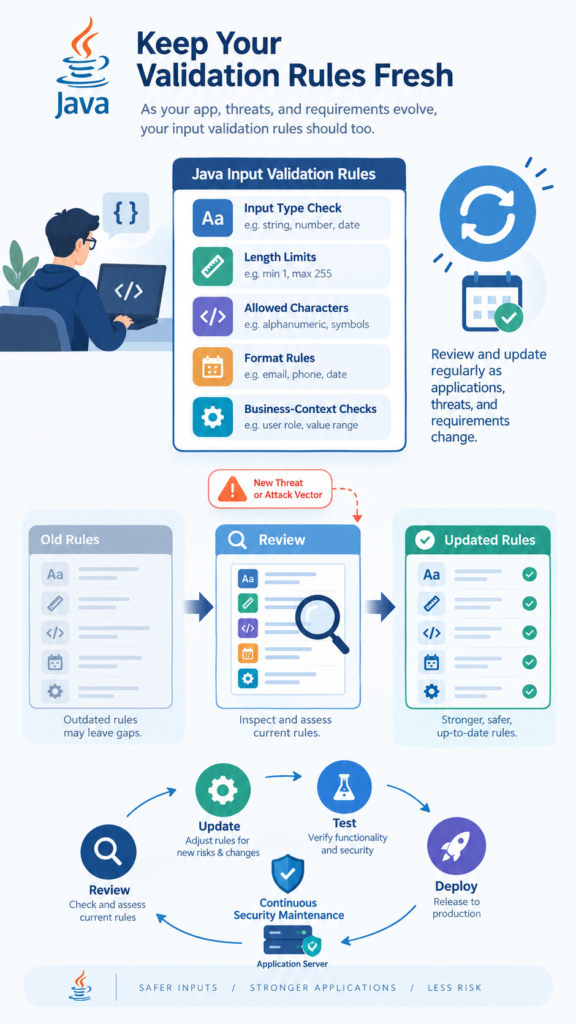
For basic constraints, absolutely. They’re fantastic. @Email, @Min, @Max, @NotEmpty. Use them. They save time and enforce consistency. The problem starts when you think a validation framework is enough for security. It’s a solid foundation, not a complete house.
These annotations operate in isolation. @Email on a field doesn’t talk to the @NotBlank on another field. There’s no way to create a rule that says, “If field A is ‘US’, then field B must match a US phone number pattern.” That requires custom constraint logic. You start by leaning on the framework, then you inevitably extend it.
We extended a @PhoneNumber annotation to accept a country code parameter. The default just checked for digits. Ours fetched a country pattern from a service and validated against it. It still used the framework’s machinery but was informed by application context. That’s the blend you need.
The other catch is that annotations often only fire when the framework’s validator is explicitly called, like during Spring MVC binding. If you’re manipulating objects elsewhere, those checks might not run.
Secure coding practices dictate that you never assume an object is valid, you re-validate critical paths in your core logic, or better, design immutable valid objects.
When should you write custom validators versus using defaults?
Credits: TechInFive
Write custom validators when your rule involves more than one piece of data or external state. The default annotations are for single-field, static rules. The moment you need to compare a start date and an end date, or check a value against a database, you need custom.
It’s not an either/or choice. You use @NotNull and @Future on your start date. You use the same on your end date. Then you write a custom @ChronologicalOrder validator at the class level that ensures endDate.isAfter(startDate).
The frameworks support this. Hibernate Validator makes it pretty straightforward to create a custom constraint and validator class.
The key is to keep custom validators focused. They should do one validation check. Don’t make a mega-validator that checks dates, formats, and database uniqueness. Compose them. Let @NotNull, @Pattern, and your custom @UniqueUsername validator all live on the same field. This makes the validation declarative and easy to understand.
What are common real-world validation failures?
The failures aren’t in the syntax checks. They’re in the missed context. A social security number field passes a regex for XXX-XX-XXXX. Looks valid. But is it a real, unassigned, or deceased person’s SSN? The framework doesn’t know. That’s a failure of validation scope.
Mass assignment is a classic. Your User model has a role field and a username field. Your form only edits username, but the attacker adds role=ADMIN to the request payload. If you’re blindly binding the request to the model (like modelMapper.map(request, User)), the role gets set.
Even if the role field has an @NotBlank annotation, it’s now “ADMIN”, which is not blank. Validation passes. Attack succeeds.
“Some frameworks support automatic binding of HTTP requests parameters to server-side objects used by the application. This auto-binding feature can allow an attacker to update server-side objects that were not meant to be modified. The attacker can possibly modify their access control level or circumvent the intended business logic of the application with this feature. This attack has a number of names including: mass assignment, autobinding and object injection.” – javaspring.net
The fix is using a Data Transfer Object (DTO) or a view-specific model that only has the fields you expect from that form. Then map those safe fields to your persistent entity. It’s a secure coding practice that frameworks encourage but don’t enforce. You have to choose to do it.
Another failure is trusting client-side validation. It’s a usability feature, not a security feature. Any attacker will bypass the JavaScript and send a direct POST request to your endpoint. If your backend relies on the framework but the framework’s rules are weaker than the client’s logic, you have a hole.
How Often Should Popular Input Validation Frameworks Java Rules Be Updated?
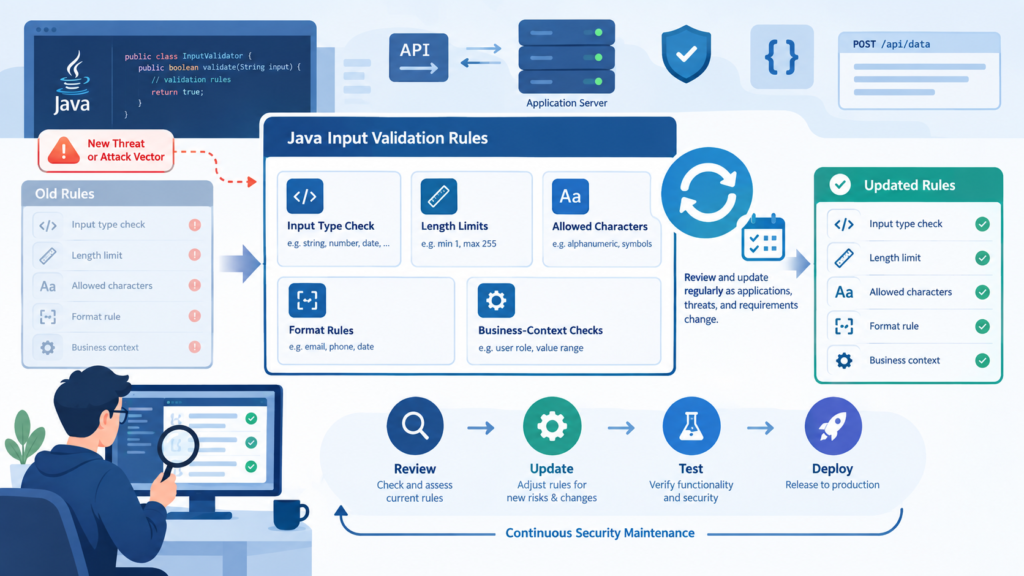
Constantly. They’re not a set-it-and-forget-it configuration. Every new feature might introduce a new input field or change the meaning of an old one. Every business rule change might require a validation update. It’s part of the development lifecycle.
We made it a part of our Definition of Done for any user story. “Acceptance criteria includes validation rules.” When the business said, “We now accept international phone numbers,” the ticket included updating the @Pattern regex and the backend service that handled the dialing logic. The framework annotation was updated in the same commit as the feature.
Beyond features, threat landscapes change. New attack vectors emerge. The OWASP Top 10 evolves. Your validation should be reviewed periodically, maybe during security sprint retrospectives, to see if it still aligns with current best practices.
Is your password complexity rule still strong enough? Is your file upload validation checking for the latest malicious file types?
Treat your validation rules like unit tests. When requirements change, you update tests. When your application’s data contract changes, you update validation. It’s that integral to code health.
FAQs
Is Hibernate Validator enough for securing a REST API?
No single tool is enough. Hibernate Validator is excellent for enforcing data integrity and format at the boundary. It stops malformed data. But securing an API requires authentication, authorization, rate limiting, output encoding, and logging. Use the validator as your first data-shaping gate, then build other security layers behind it.
What’s the biggest mistake with Spring Boot validation?
Assuming @Valid in your controller is a silver bullet. It validates the object shape. It doesn’t prevent business logic flaws or mass assignment attacks. You must combine it with techniques like using @ModelAttribute for binding control or DTOs to define exact expected payloads.
Can input validation prevent SQL Injection?
It can help, but it’s not the primary defense. Validating that an input is a number before using it in a query is good. However, the real fix is using parameterized queries or prepared statements. Validation might stop some malicious strings, but query parameterization makes injection impossible by separating code from data.
How do you validate complex nested JSON objects?
Use nested validation. In Java Bean Validation, you can annotate a field in your main DTO with @Valid. This tells the framework to also validate the object stored in that field. For example, an OrderRequest DTO with a List<@Valid LineItem> line
When Validation Meets Real Security
Popular Java validation frameworks are useful, but they cannot catch every security flaw on their own. They mainly check input format, while real attacks often exploit business logic, context, or unsafe data handling.
Strong Secure Coding Practices add the missing layers through context-aware validation, DTOs, sanitization, and regular rule updates. Treat validation as part of a wider security strategy, not your only defense. Learn more about secure coding practices to strengthen your application security.
References
- https://github.com/nemo-nesciam/OWASP-Cheat-Sheet/blob/master/cheatsheets/Input_Validation_Cheat_Sheet.md#1
- https://www.javaspring.net/blog/validate-input-java/